Notice. New forum software under development. It's going to miss a few functions and look a bit ugly for a while, but I'm working on it full time now as the old forum was too unstable. Couple days, all good. If you notice any issues, please contact me.
ville56 Guru Joined: 08/06/2022 Location: AustriaPosts: 612
Posted: 05:10pm 10 Sep 2026
Copy link to clipboard
Print this post
Martin,
what is the difference in setting up your Pico vs. PC3?
Did you do a OPTION RESET PICO COMPUTER 3 or did you selectively set all the options? Maybe the reset options does invoke the different behavior.
Suggestion (if you use HDMI): Try to do a full flash nuke, reload the hdmiusb .uf2 and then only selectively set the HDMI pins for the PC3 and the display mode you need. That should be sufficient as the console pins are default GPIO8/9. Then try to check if the behaviour is different. If so, the problem seems to come from the reset pico computer 3.
Gerald 73 de OE1HGA, Gerald
Martin H. Guru Joined: 04/06/2022 Location: GermanyPosts: 1552
Posted: 05:34pm 10 Sep 2026
Copy link to clipboard
Print this post
Hi Gerald, Thank you very much for your prompt reply. I haven’t changed any of the settings; unfortunately, there’s been no change Edit: I’ve just realised that Matthias has preinstalled Version V6.03.02b1, so I suppose I’m in the wrong place here cheers Martin Edited 2026-09-11 03:46 by Martin H.'no comment
matherp Guru Joined: 11/12/2012 Location: United KingdomPosts: 11881
Posted: 05:45pm 10 Sep 2026
Copy link to clipboard
Print this post
It's possible that there is a bug. Does Petscii run OK? If not will fix.
ville56 Guru Joined: 08/06/2022 Location: AustriaPosts: 612
Posted: 06:01pm 10 Sep 2026
Copy link to clipboard
Print this post
IMHO this could cause the problem, use that only selectively for the test.
2 ideas:
1) nuke the flash and load the "plain" HDMIUSB .uf2 file (e.g. PicoMiteHDMIUSBV6.03.02b3.uf2)
and then type "OPTION HDMI PINS 1, 3, 5, 7" and maybe "OPTION RESOLUTION 640x480, 315000" to set up the HDMI interface to what you have now. Do NOT use "OPTION RESET PICO COMPUTER 3" explicitly for this test. Check if the problem is still there.
if 1) shows the desired (previous) layer behaviour then:
2) issue the "OPTION RESET PICO COMPUTER 3" and see if the problem returns.
if already 1) shows the issue, I currently have no idea where it comes from ... and you have to recall what options you used before testing on the PC3 hardware.
if 1) works as desired and 2) fails the the issue is in the reset option pico computer 3.
Gerald 73 de OE1HGA, Gerald
mozzie Guru Joined: 15/06/2020 Location: AustraliaPosts: 435
Posted: 06:10pm 10 Sep 2026
Copy link to clipboard
Print this post
G'day, A quick test shows this is the same on RP2350A / RP2350B HDMIUSB builds and changes depending on mode and resolution, had noticed this a while ago but thought it was my program rather than a problem:
640x480: (252/378Mhz) Mode 2 OK / Mode 3 OK / Mode 4 ?? / Mode 5 OK Mode 4 loses upper section of screen using martins test program, approx 20 lines.
1024x600: Mode 2 NOK / Mode 3 OK / Mode 5 NOK
Using MMbasic V6.03.02b2 on both boards Option Reset HDMIUSB for RP2350A on PC1 Standard options for RP2350B on PC3
No other modes / resolutions tested. No PSRAM on either build.
Regards, Lyle. Edited 2026-09-11 04:16 by mozzie
ville56 Guru Joined: 08/06/2022 Location: AustriaPosts: 612
Posted: 06:17pm 10 Sep 2026
Copy link to clipboard
Print this post
Martin,
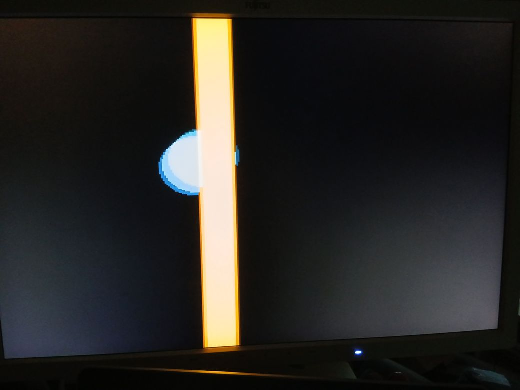
I've just seen that you provided the test-code for the bar/ball example. Tried it and yes, if you issue "option reset pico computer 3" the problem you described is there (ball behind bar).
I've tried it with just the option reset hdmiusb option hdmi pins 1,3,5,7 and it works as expected (bar behind ball)
So the "option reset pico computer 3" is the root cause. It tweaks something with the layer sequence.
Maybe Peter can correct that. In the meanwhile you have to set all the required options for the PC3 manually.
Gerald 73 de OE1HGA, Gerald
Martin H. Guru Joined: 04/06/2022 Location: GermanyPosts: 1552
Posted: 06:17pm 10 Sep 2026
Copy link to clipboard
Print this post
not really Here, too, the figure appears behind the background This concerns MMBasic USB RP2350B Edition V6.03.02b1. I’ll try out other versions once I’ve worked out how to update the firmware ;-)'no comment
ville56 Guru Joined: 08/06/2022 Location: AustriaPosts: 612
Posted: 07:06pm 10 Sep 2026
Copy link to clipboard
Print this post
Martin,
this is a strange behaviour but I think I found a sequence to get it working:
1) nuke the flash (I used universal_flash_nuke.uf2) 2) load PicoMiteHDMIUSBV6.03.02b3.uf2 3) load the test program and check if it works correctly 4) load PicoMiteHDMIWEBV6.03.02b3.uf2 5) load the test program again and it did work correctly the result is reboot stable here.
seems to be a bug in PicoMiteHDMIWEBV6.03.02b3.uf2 on a plain PC3.
Gerald Edited 2026-09-11 05:08 by ville56 73 de OE1HGA, Gerald
Martin H. Guru Joined: 04/06/2022 Location: GermanyPosts: 1552
Posted: 07:12pm 10 Sep 2026
Copy link to clipboard
Print this post
I’ve now managed to install firmware 6.03.00; the layout of N and L is correct here – (the circle is in front of the bar) So the fault is a firmware issue with the newer versions'no comment
ville56 Guru Joined: 08/06/2022 Location: AustriaPosts: 612
Posted: 07:21pm 10 Sep 2026
Copy link to clipboard
Print this post
Carefully:
homa sent the boards with HDMIWEB installed. But HDMIUSB also works on the PC3. And the difference is -> HDMIWEB shows the bug (at least in V6.03.02b3) -> HDMIUSB works correctly.
So id you have changed now from HDMIWEB to HDMIUSB this would also work in V6.03.02b3.
my conclusion: If you do not need the Web functions, you can use the HDMIUSB version: PicoMiteHDMIUSBV6.03.02b3.uf2, works out of the box.
the problem is in HDMIWEB version: PicoMiteHDMIWEBV6.03.02b3.uf2
BTW, the sequence I posted is not working reliable, so forget it. Sorry, my bad!!
Gerald Edited 2026-09-11 05:33 by ville56 73 de OE1HGA, Gerald
Martin H. Guru Joined: 04/06/2022 Location: GermanyPosts: 1552
Posted: 07:37pm 10 Sep 2026
Copy link to clipboard
Print this post
Hey Gerald, great, so you’ve narrowed down the problem. I’ll install the PicoMiteHDMIUSBV6.03.02b3.uf2 version tomorrow and wait until Peter has sorted it out.as web isn’t a top priority for me at the moment. Thanks Martin'no comment
ville56 Guru Joined: 08/06/2022 Location: AustriaPosts: 612
Posted: 07:43pm 10 Sep 2026
Copy link to clipboard
Print this post
Martin,
at least HDMIUSB works reliably here on the same board as you have and HDMIWEB always and reproducable shows the issue. Later tomorrow I'll try to narrow down between which version the issue showed up first time so Peter has an additional clue where it was introduced.
Gerald 73 de OE1HGA, Gerald
ville56 Guru Joined: 08/06/2022 Location: AustriaPosts: 612
Posted: 05:03am 11 Sep 2026
Copy link to clipboard
Print this post
@Peter,
there may be a problem in the visibility of framebuffer L and framebuffer N in the PicoMiteHDMIWEBV6.03.02b3 as L appears in foreground and N in background.
In the PicoMiteHDMIUSBV6.03.02b3 N is foreground and L background, which is what is expected. Seems to be that way since the first release of PicoMiteHDMIWEB.
Can be tested with Martins code:
Option default integer MODE 2 CLS FRAMEBUFFER Layer bx=0:by=0:xr=1:bc=RGB(255,170,0):cc=RGB(0,170,255) cx=10:cy=10:cxr=2:cyr=2 Do FRAMEBUFFER wait FRAMEBUFFER write l CLS Circle cx,cy,20,1,1,cc,cc Inc cx,cxr:Inc cy,cyr FRAMEBUFFER write n Box bx,by,20,240,,0,0 Inc bx,xr Box bx,by,20,240,,bc,bc If bx>300 Or bx<=0 Then xr=-xr If cx>300 Or cx<=10 Then cxr=-cxr If cy>220 Or cy<=10 Then cyr=-cyr Loop
Gerald
Edit: PicoMiteHDMIWEBV6.03.02b3 often crashes on exit with F2 from the editor (editing the code above, like changing n/l buffers). Also seems like the code must have been run before to provoke the crash. Sometimes the crash erases the flash. Sometimes it does a reboot, somtimes it hangs after the crash.
*** FAULT PC=100028DE LR=100028D9 SP=20080EA0 CFSR=00010000 HFSR=40000000 *** FAULT R0=001E9000 R1=00024000 R2=00000000 R3=200695F8 R12=20080F08 XPSR=69100000 FAR=FFFFFFFF EXC=FFFFFFE9 Total of 6 Mbytes PSRAM available > Multi-touch Connected on channel 4 (6 contacts, 2048x2048)
happens on: PicoMiteHDMIWEB MMBasic USB RP2350B Edition V6.03.02b3 OPTION SERIAL CONSOLE COM2,GP8,GP9 OPTION SYSTEM I2C GP20,GP21 OPTION FLASH SIZE 16777216 OPTION COLOURCODE ON OPTION KEYBOARD US OPTION PICO OFF OPTION RESOLUTION 640x480 @ 315000KHz OPTION HDMI PINS 1, 3, 5, 7 OPTION SDCARD GP33, GP30, GP31, GP28 OPTION AUDIO I2S GP10,GP22', ON PWM CHANNEL 11 OPTION RTC AUTO ENABLE OPTION COUNT GP34,GP35,GP36,GP37 OPTION MODBUFF ENABLE 512 OPTION PLATFORM PICO COMPUTER 3 OPTION PSRAM PIN GP47 Edited 2026-09-11 15:53 by ville56 73 de OE1HGA, Gerald
Volhout Guru Joined: 05/03/2018 Location: NetherlandsPosts: 6118
matherp Guru Joined: 11/12/2012 Location: United KingdomPosts: 11881
Posted: 06:50am 11 Sep 2026
Copy link to clipboard
Print this post
I'm travelling until Sunday so will look at the problem then. Just an issue of two pointers the wrong way round.
Martin H. Guru Joined: 04/06/2022 Location: GermanyPosts: 1552
Posted: 08:28am 11 Sep 2026
Copy link to clipboard
Print this post
Thank you very much, it seems to only affect the web version. I’ve just installed the latest HDMIUSB version, and the error doesn’t occur there. Another thing I noticed was that, with a resolution of 640, you can’t select Mode 3 or 4 in the web version.'no comment
ville56 Guru Joined: 08/06/2022 Location: AustriaPosts: 612
Posted: 09:10am 11 Sep 2026
Copy link to clipboard
Print this post
Martin,
make sure you have really HDMIUSB installed. Tried and it works here. I suppose you still have HDMIWEB running which does not support all modes that HDMIUSB does.
Gerald 73 de OE1HGA, Gerald
Martin H. Guru Joined: 04/06/2022 Location: GermanyPosts: 1552
Posted: 10:04am 11 Sep 2026
Copy link to clipboard
Print this post
wie oben geschrieben : "HDMIUSB version, and the error doesn’t occur there." Dort tritt der Fehler nicht auf. The fault described, relating to the MODE issues, also applies exclusively to the WEB version, not to USBHDMI(in my experience so far) Edited 2026-09-11 20:06 by Martin H.'no comment
matherp Guru Joined: 11/12/2012 Location: United KingdomPosts: 11881
Posted: 11:59am 11 Sep 2026
Copy link to clipboard
Print this post
The web version doesn't support modes 3 and 4. There is only so much RAM....
Martin H. Guru Joined: 04/06/2022 Location: GermanyPosts: 1552
Posted: 12:53pm 11 Sep 2026
Copy link to clipboard
Print this post
I’d just noticed it. So it’s done on purpose. That makes sense . Edited 2026-09-11 22:54 by Martin H.'no comment

 Notice. New forum software under development. It's going to miss a few functions and look a bit ugly for a while, but I'm working on it full time now as the old forum was too unstable. Couple days, all good. If you notice any issues, please contact me.


 Print this post

 .
.