Notice. New forum software under development. It's going to miss a few functions and look a bit ugly for a while, but I'm working on it full time now as the old forum was too unstable. Couple days, all good. If you notice any issues, please contact me.
Some small internal changes. You made need to reload programs/libraries Fixes bug in Calculator mode when OPTION EXPLICIT is set RP2350 STAR and ASTRO commands now allow string literals or variables for the object GPS_Astro_Reference.pdf
terekgabor Senior Member Joined: 02/01/2026 Location: HungaryPosts: 129
Posted: 02:02pm 07 May 2026
Copy link to clipboard
Print this post
Peter!
Thank you! This basic is useful tool!
G@bor
mozzie Guru Joined: 15/06/2020 Location: AustraliaPosts: 435
Posted: 02:45pm 07 May 2026
Copy link to clipboard
Print this post
G'day Peter, Found this while writing a test program for the 4 axis stepper system. Not sure if this is the intended operation although the frame command is great for setting out information on the console, regardless of a connected LCD.
If I try to create a FRAME layout on the console without an attached LCD panel I get:
On a RP2350B system with PSRAM it says "NOT ENOUGH PSRAM" or similar. I would guess this is because MM.HRES / MM.VRES are set to 0.
If a hardware or Virtual LCD panel is set then the FRAME system works fine.
A couple more questions:
Is there a way to clear the console (terminal) screen from MMBasic?
In the STEPPER system, as far as I can tell from stepper.c the enable signals are all set / reset together, meaning we could use 1 enable pin for all axis. Is this correct?
Regards, Lyle. Edited 2026-05-08 01:10 by mozzie
matherp Guru Joined: 11/12/2012 Location: United KingdomPosts: 11882
Posted: 03:34pm 07 May 2026
Copy link to clipboard
Print this post
That is a bug, the Frame command should be fully usable without an attached display - will fix.
print chr$(27)+"[2J"+chr$(27)+"[H"; will clear the screen
No it won't allow duplicate pins
mozzie Guru Joined: 15/06/2020 Location: AustraliaPosts: 435
Posted: 03:51pm 07 May 2026
Copy link to clipboard
Print this post
Hi Peter, Thanks for the reply, I could have worded that question better.
It would appear from Stepper.c that all the axis enable signals are set/cleared together, so if we declare the Enable pin on 1 axis only and then use that Enable pin to control all the stepper driver Enable inputs, would that work?
Or are the individual axis Enable signals set / cleared separately at times?
Apologies if that is no clearer, its been a long couple of days
Hopefully I'll get a chance to load V60300RC4 and do some on machine testing over the weekend.
Regards, Lyle.
ville56 Guru Joined: 08/06/2022 Location: AustriaPosts: 612
Posted: 04:37pm 07 May 2026
Copy link to clipboard
Print this post
Peter,
with RC4 and calculator mode:
option explicit works now but
option default none causes
>2+3 Error : Variable type not specified
> option list PicoMite MMBasic RP2350B V6.03.00RC4 73 de OE1HGA, Gerald
matherp Guru Joined: 11/12/2012 Location: United KingdomPosts: 11882
Posted: 04:38pm 07 May 2026
Copy link to clipboard
Print this post
To use one enable pin, just specify the enable pin on one axis. Then connect all the enable input on all the drivers to that pin (take care of drive current). Then use STEPPER ENABLE ALL and everything should work
Fixed - will be in the next RC Edited 2026-05-08 03:24 by matherp
grumpyoldgeek Regular Member Joined: 30/07/2018 Location: United StatesPosts: 58
Posted: 08:32pm 07 May 2026
Copy link to clipboard
Print this post
Amazon Beetle is probably not a good choice. https://www.amazon.com/dp/B0F5PQMT6S?ref=ppx_yo2ov_dt_b_fed_asin_title
Runs the V6.02.01 firmware after loading it twice.
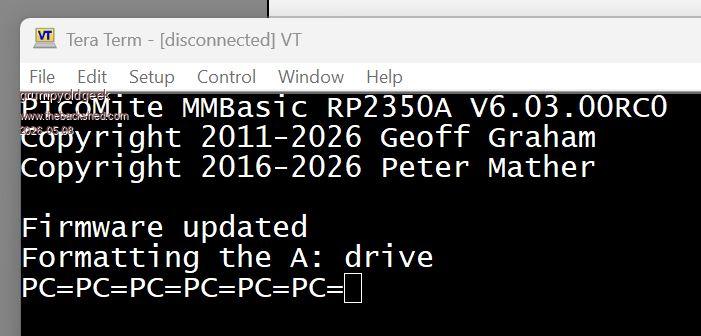
Locks up and gives this with V6.03.00RC0 Edited 2026-05-08 06:33 by grumpyoldgeek
matherp Guru Joined: 11/12/2012 Location: United KingdomPosts: 11882
Posted: 09:38pm 07 May 2026
Copy link to clipboard
Print this post
The RP2350 code won't run with only 2Mb of flash. The Pico2 has 4Mb which is the lowest required. If you could swap the flash chip it would probably be OK
JanVolk Guru Joined: 28/01/2023 Location: NetherlandsPosts: 411
Posted: 09:46pm 07 May 2026
Copy link to clipboard
Print this post
Peter,
Thanks for the many updates and new features. F12 works excellently for me with EDIT. You just need to understand the method you use for the comments, and then it works fine.
When updating, I use UPDATE FIRMWARE after first preparing the latest .uf2 file with a copy, and everything runs smoothly. However, after an update, I notice that various files are no longer readable properly from the A: drive, even though there is nothing unusual to be seen with the A: files. The solution is to use drive "a:/format" and copy everything back with FM, which is very simple these days if you have a B: drive. I often notice that A: is formatted automatically, but not always. Perhaps a check beforehand and a format after the update prevents annoyance, or is a format always required?
Are there other people with the same experience?
> option list PicoMite MMBasic RP2350A V6.03.00RC4 OPTION SYSTEM I2C GP20,GP21 OPTION FLASH SIZE 4194304 OPTION COLOR CODE ON OPTION HEARTBEAT OFF OPTION PICO OFF OPTION CPU SPEED (KHz) 200000 OPTION DISPLAY 50, 100 OPTION SDCARD GP22, GP6, GP7, GP4 OPTION RTC AUTO ENABLE OPTION F1 help OPTION F5 list commands OPTION F6 list functions OPTION F7 list pins OPTION F8 list system i2c OPTION F9 fm
Jan.
ville56 Guru Joined: 08/06/2022 Location: AustriaPosts: 612
Posted: 07:01am 08 May 2026
Copy link to clipboard
Print this post
Jan,
had to reload the program when updateing from RC3 to RC4, files on A: were not affected. But they are just some small textfiles. It may also depend on the version you are coming from ...
Gerald 73 de OE1HGA, Gerald
matherp Guru Joined: 11/12/2012 Location: United KingdomPosts: 11882
Fixes bug in calculator immediate mode when OPTION DEFAULT NONE is set Fixes bug in stepper drive for the A axis when the F speed is greater than the axis maximum Adds support for configuring the TMC2208/9 stepper drivers over a serial connection. I'll start a separate thread on this as I think it is potentially very useful.
bfwolf Senior Member Joined: 03/01/2025 Location: GermanyPosts: 258
Posted: 08:15am 08 May 2026
Copy link to clipboard
Print this post
I really like the idea of a "Calculator immediate mode"!
The variable MM.ANSWER would also correspond roughly to the "Ans" key found on many calculators — such as those made by Casio.
I had an idea on how to take this concept a logical step further:
If you enter a "partial expression" preceded by an operator — for instance, '+3/4' — the "Calculator immediate mode" would implicitly insert MM.ANSWER as the left-hand operand; the expression would then be calculated as 'MM.ANSWER+3/4'.
In short: this would apply whenever the left-side operand is missing.
A minor "complication" that arises from this is: How would one then enter a sign (+ or -)? Perhaps, for example, if the intended calculation is 'MM.ANSWER + -3/4', the required input would simply be '+-3/4' ?
However, I’m not sure how complicated that would be to implement?
Greetings, bfwolf
matherp Guru Joined: 11/12/2012 Location: United KingdomPosts: 11882
Posted: 11:03am 08 May 2026
Copy link to clipboard
Print this post
Could be tricky because of * but I'll see what can be done
*(-5) Edited 2026-05-08 21:18 by matherp
bfwolf Senior Member Joined: 03/01/2025 Location: GermanyPosts: 258
Posted: 11:26am 08 May 2026
Copy link to clipboard
Print this post
Would '*-5' be illegal in an ordinary BASIC expression? E.g. 'a=3*-5'
And '0 <ENTER-KEY> would just simply set 'MM.ANSWER=0' ant 0 would be shown as result..
This way we would have a "pocket calculator"..
Oh forgot about this, danger: Would entering just a integer >0 delete a program line numbered with this value? Didn't try.. If this would be the case, one must e.g. 100. instead of just 100
A thought on this: To prevent ambiguities in Command Mode, perhaps a (non-permanent) option could be introduced: 'OPTION CALCULATOR on/off' Edited 2026-05-08 21:46 by bfwolf
matherp Guru Joined: 11/12/2012 Location: United KingdomPosts: 11882
Posted: 12:08pm 08 May 2026
Copy link to clipboard
Print this post
No, there is no line editing like that in MMbasic
(-5) is only needed to set MM.ANSWER to -5 without subtracting 5 from the current value *-5 is fine no calc mode needed
bfwolf Senior Member Joined: 03/01/2025 Location: GermanyPosts: 258
Posted: 12:22pm 08 May 2026
Copy link to clipboard
Print this post
How about '=-3' as an alternate form to assign 'MM.ANSWER=-3' so MM.ANSWER would always be the implicit target, if line starts with '=' ?
matherp Guru Joined: 11/12/2012 Location: United KingdomPosts: 11882
Posted: 12:27pm 08 May 2026
Copy link to clipboard
Print this post
No more changes. = has very specific meaning and would need massive change to implement
bfwolf Senior Member Joined: 03/01/2025 Location: GermanyPosts: 258
Posted: 01:05pm 08 May 2026
Copy link to clipboard
Print this post
Yes, release-candidates phase since several days, so feature-freeze !!!
I think, one could live with (-5) to set MM.ANSWER to -5. Perhaps the closing ')' could be omitted, but this possibly requires the expression-evaluator to be changed heavily.. So forget it..
matherp Guru Joined: 11/12/2012 Location: United KingdomPosts: 11882
Adds the ability to modify MM.ANSWER at the command prompt by starting the string with a symbolic operator 5 +5 etc. This imposes one syntactic constraint. To set MM.ANSWER to a negative number or a negative expression, include the value in backets (-5)
Adds the ability to invert the limit switches in the stepper command Adds the ability to configure Stallguard for the TMC2209, which enables "sensorless homing" (sometimes referred to as a "smart stop" or virtual endstop), allowing 3D printers and CNC machines to detect when a motor stalls, eliminating the need for physical limit switches.Full details in the manual Stepper_Reference.pdf
Page 4 of 31
Print this page
The Back Shed's forum code is written, and hosted, in Australia.

 Notice. New forum software under development. It's going to miss a few functions and look a bit ugly for a while, but I'm working on it full time now as the old forum was too unstable. Couple days, all good. If you notice any issues, please contact me.


 Print this post