Notice. New forum software under development. It's going to miss a few functions and look a bit ugly for a while, but I'm working on it full time now as the old forum was too unstable. Couple days, all good. If you notice any issues, please contact me.
hhtg1968 Guru Joined: 25/05/2023 Location: GermanyPosts: 317
Posted: 11:37am 26 Oct 2026
Copy link to clipboard
Print this post
perhaps I posted it in the wrong category earlier...:
I am confused about screen resolutions, modes and so on. I think I do not understand the system.
I use my cmm2 on a vga monitor with resolution 1024,768.
so I entered "option default mode 9" because I want to "use" the pixels 1:1.
I also entered "option picomite hdmi, 1024x768.
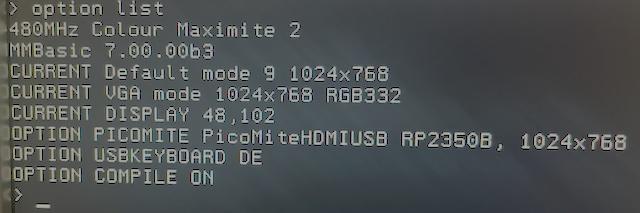
option list:
When I now start a program without any command like resolution, mode etc...
(1 liner : Print "Hello")
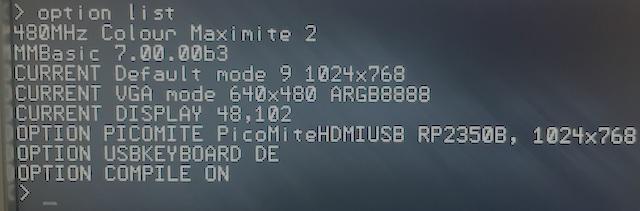
the computer switches to 640x480. and it stays so in the command line.
the "current vga" changed to 640x480
if I enter now "edit" the editor opens in 1024x768 and it stays so after esc.
is "option default mode 9" incompatible with "option picomite"?
PhenixRising Guru Joined: 07/11/2023 Location: United KingdomPosts: 2149
Posted: 11:37am 26 Oct 2026
Copy link to clipboard
Print this post
Those closed-loop steppers are really neat. I have been following a few projects that use them.
With the Picomite, any stepper can be closed-loop because we have PIO quadrature encoder interfaces (QEI)
hhtg1968 Guru Joined: 25/05/2023 Location: GermanyPosts: 317
Posted: 02:09pm 26 Oct 2026
Copy link to clipboard
Print this post
this problem is eventually not a new problem at v7 (or my mistake):
I changed the sd card in my cmm2 (g1). everything is in order but in the status line (down at the screen) is the text recent filename + "check disk". if I take the card out (and put it back again) I can read there "... wrong disk".
what is the reason?
TrevorC Newbie Joined: 15/07/2020 Location: United KingdomPosts: 19
Posted: 03:58pm 26 Oct 2026
Copy link to clipboard
Print this post
I am also getting the status line text recent filename + "check disk". Also removing disk and putting it back in gives "wrong disk". This on a CMM2 gen1.
Trevor
matherp Guru Joined: 11/12/2012 Location: United KingdomPosts: 12172
Posted: 04:00pm 26 Oct 2026
Copy link to clipboard
Print this post
Thanks for the report - it shows a trap in how these options are entered.
What the two options do
OPTION DEFAULT MODE sets the Colour Maximite 2's own display: the command prompt, the editor, the file manager, and Colour Maximite 2 programs. OPTION PICOMITE is for running PicoMite programs. While it is set, every program that does not set a MODE starts in the PicoMite's MODE 1 - a two-colour mode - at the PicoMite resolution given in the option. That includes a one-liner like Print "Hello". When the program ends its display stays at the prompt (as on the PicoMite) until you use EDIT or FM, which use DEFAULT MODE again.
Why you got 640x480 The resolution must follow a comma:
OPTION PICOMITE HDMI, 1024x768
Without the comma, OPTION PICOMITE HDMI 1024x768 is accepted without an error but the resolution is lost, and 640x480 is used. Please check OPTION LIST: the line should read
OPTION PICOMITE PicoMiteHDMIUSB RP2350B, 1024x768
If it says 640x480, enter the option again with the comma. Then programs, the prompt and the editor all stay at 1024x768.
If you are not running PicoMite programs, OPTION PICOMITE NONE puts everything back to the Colour Maximite 2's own modes.
In the next beta
OPTION PICOMITE without a resolution uses the resolution of OPTION DEFAULT MODE (1024x768 with DEFAULT MODE 9), so the monitor keeps one resolution throughout. A resolution without the comma gives the error "A comma is needed before the resolution". The PicoMite's own OPTION RESOLUTION 1024x768 is accepted. OPTION LIST shows the resolution in use as CURRENT PICOMITE resolution.
hhtg1968 Guru Joined: 25/05/2023 Location: GermanyPosts: 317
Posted: 05:46pm 26 Oct 2026
Copy link to clipboard
Print this post
@matherp:
many thanks so far.
hhtg1968 Guru Joined: 25/05/2023 Location: GermanyPosts: 317
Posted: 02:03pm 28 Oct 2026
Copy link to clipboard
Print this post
earlier I wrote that my cmm2 g2 does not give signals to vga port after updating. I repeated this without success.
(my cmm2g1 runs perfectly with v7)
Now I try to connect via console/ terminal.
wich usb port I have to use?
manual says usb b (g1). so I use usb-c.
ls /dev/tty*
.../dev/tty.usbserial-110
(not ...modem)
screen /dev/tty.usbserial-110 does not run
or another usb-port?
(or cmm2 broken? I had it not in use before the update. so it could theoretically be broken before...)
okwatts Regular Member Joined: 27/09/2022 Location: CanadaPosts: 93
Posted: 02:38pm 28 Oct 2026
Copy link to clipboard
Print this post
I know this is obvious, but did you switch the jumper back after updating the firmware?
Mixtel90 Guru Joined: 05/10/2019 Location: United KingdomPosts: 9328
Posted: 03:37pm 28 Oct 2026
Copy link to clipboard
Print this post
Did the firmware upload and verify? If it did then there's a good chance that the CMM2 is fine. After all, it had to be running and your system had to be connected to the right port.
This is something I've never done in Linux. If you had access to Windows it might be simpler. No doubt someone else here will have done it.Mick
hhtg1968 Guru Joined: 25/05/2023 Location: GermanyPosts: 317
Posted: 05:51pm 28 Oct 2026
Copy link to clipboard
Print this post
yes i switched the jumper back.
upload and verify ok. - says stm32 app.
green led is on.
okwatts Regular Member Joined: 27/09/2022 Location: CanadaPosts: 93
Posted: 06:11pm 28 Oct 2026
Copy link to clipboard
Print this post
I have been using linux for this and as it was a long time, I originally upgraded my G2 version incorrectly (but it worked!) by using the USB-C port. But by the time I was trying to upgrade to beta4 this no longer worked. My CMM2 did not respond to DFU or even back as a serial port when I replaced the jumper for running(Turns out this was due to a conflict with the serial driver and the brltty driver). This was on Linux Mint using STM-Cube v2.14. When I realized the error I changed to another computer also running Linux Mint with STMCube v2.23 and used a Male-Male type A cable but it still didn't connect for programming using the DFU. I ended up using the USB-C port (with the jumper for programming) in the serial port variant (/dev/ttyUSB0). This worked fine, but I am at a loss since linux sees the DFU connection when in that mode but ST-Cube didn't see the CMM2 for programming. It is possible that in the different versions of STMCube there is an issue in seeing the DFU. In the end the second variant on Appendix K worked for me.
Mixtel90 Guru Joined: 05/10/2019 Location: United KingdomPosts: 9328
Posted: 07:06pm 28 Oct 2026
Copy link to clipboard
Print this post
AFAIK the green LED only indicates that 3V3 is present.
For the chip to verify the firmware it has to have loaded it and be running. They are pretty rugged chips once they are soldered in.
STM32 Cube has an option to do a complete flash wipe, it may be an idea to do that and reload.
Also... Is there 5V actually at the power switch? It wouldn't be the first time that someone has been attempting to use a charcoal string lead as supplied with some printers instead of a wired one. The CMM2 is very sensitive to it's 5V supply.
Are you sure the VGA lead is ok? You can use a multimeter with a frequency range to check the presence of HSYNC and VSYNC. The colour signals are analogue voltages.
Are you sure the VGA lead is ok? You don't get completely non-functional VGA on a running CMM2 although you can get the wrong colours if resistor joints are bad. It's a digital/resistor network like the Pico but bigger.Mick
hhtg1968 Guru Joined: 25/05/2023 Location: GermanyPosts: 317
Posted: 07:21pm 28 Oct 2026
Copy link to clipboard
Print this post
@okwatts: I updated the cmm2 g2 with the upper usb a after wiping flash.
later I tried to connect with terminal via usb-c.
before that I tried to connect via usb-a and there was nothing at ls /dev/tty*
then i took the usb c and it appears .../dev/tty.usbserial-110 (not .../dev/tty.usbmodem-110. when I connect the picomite there is "...modem". I do no know what is right at cmm2) but a connection with "screen ..." was not possible. the cursor did not blink.
@mick: sure, it is possible that the vga lead is not ok. I will try to find it. (at power switch I will search too etc.)
hhtg1968 Guru Joined: 25/05/2023 Location: GermanyPosts: 317
Posted: 07:22pm 28 Oct 2026
Copy link to clipboard
Print this post
@okwatts: I updated the cmm2 g2 with the upper usb a after wiping flash.
later I tried to connect with terminal via usb-c.
before that I tried to connect via usb-a and there was nothing at ls /dev/tty*
then i took the usb c and it appears .../dev/tty.usbserial-110 (not .../dev/tty.usbmodem-110. when I connect the picomite there is "...modem". I do no know what is right at cmm2) but a connection with "screen ..." was not possible. the cursor did not blink.
@mick: sure, it is possible that the vga lead is not ok. I will try to find it. (at power switch I will search too etc.)
okwatts Regular Member Joined: 27/09/2022 Location: CanadaPosts: 93
Posted: 03:09pm 29 Oct 2026
Copy link to clipboard
Print this post
It appears that you are using a Mac and I have no experience with that. My only suggestion is to ensure in your attempt to connect using screen that the baud rate is 115200. Another idea is to use your older CMM2 and try to connect to it using the same commands and confirm that works without any issues. At least then you can rule out a few things.
PeteCotton Guru Joined: 13/08/2020 Location: CanadaPosts: 669
Posted: 07:22pm 29 Oct 2026
Copy link to clipboard
Print this post
I finally got time to install this and it worked first time. Wow, my games run much smoother. Heliblast, which was really more of a tech demo than a proper game, is silky smooth on it. I might need to go back and revisit that "game".
Once again, thank you!
PhenixRising Guru Joined: 07/11/2023 Location: United KingdomPosts: 2149
Posted: 07:24pm 29 Oct 2026
Copy link to clipboard
Print this post
Been waiting for you reaction
PeteCotton Guru Joined: 13/08/2020 Location: CanadaPosts: 669
Posted: 08:33pm 29 Oct 2026
Copy link to clipboard
Print this post
I've been deliberately avoiding playing with the new version until I had some time. Now that I've looked at the massive amount of additions to the language, I don't think I have enough time! This is really exciting stuff.
hhtg1968 Guru Joined: 25/05/2023 Location: GermanyPosts: 317
Posted: 08:14am 30 Oct 2026
Copy link to clipboard
Print this post
11200 baud di not function
I try your idea to use the other cmm2
Mixtel90 Guru Joined: 05/10/2019 Location: United KingdomPosts: 9328
Posted: 08:57am 30 Oct 2026
Copy link to clipboard
Print this post
I don't know if that was accidental, but the firmware update speed is 1200 baud, not 11200 baud.Mick

 Notice. New forum software under development. It's going to miss a few functions and look a bit ugly for a while, but I'm working on it full time now as the old forum was too unstable. Couple days, all good. If you notice any issues, please contact me.


 Print this post