Notice. New forum software under development. It's going to miss a few functions and look a bit ugly for a while, but I'm working on it full time now as the old forum was too unstable. Couple days, all good. If you notice any issues, please contact me.
Peter63 Senior Member Joined: 28/07/2017 Location: SwedenPosts: 214
Posted: 07:41am 23 Sep 2026
Copy link to clipboard
Print this post
OK checking...
ville56 Guru Joined: 08/06/2022 Location: AustriaPosts: 623
Posted: 07:43am 23 Sep 2026
Copy link to clipboard
Print this post
just tried, the cursor artefact also appears with a ST7789_320 display but not with ILI9488. cursor hide has no effect.
Gerald 73 de OE1HGA, Gerald
matherp Guru Joined: 11/12/2012 Location: United KingdomPosts: 11928
Posted: 07:45am 23 Sep 2026
Copy link to clipboard
Print this post
Could be a duff pin on your Pico or a wiring bug. Are you running on long wires? I guarantee on my ST7789_320 all aspects of gui cursor are working as expected.
Peter63 Senior Member Joined: 28/07/2017 Location: SwedenPosts: 214
Posted: 07:55am 23 Sep 2026
Copy link to clipboard
Print this post
here are some info...
is modification possible?
/Peter63
ville56 Guru Joined: 08/06/2022 Location: AustriaPosts: 623
Posted: 07:58am 23 Sep 2026
Copy link to clipboard
Print this post
yes, the wires are rather long (abt 20 cm), not terminated and constitute a bus with 6 displays in all but as there are no other side effects, I doubt that theory. But transmission lines are always a dog. I'm running that display with a BLIT WRITE every second over the full display area (clock seconds display) and there was never any distorted pixel whatever I display on it. Do the cursor display routines use different timing as the other display routines (BLIT, TEXT, ...) do?
Gerald
P.S. if I find time tomorrow, I could set up a ST7789_320 with a clean and short wiring and test it again. Edited 2026-09-23 17:59 by ville56 73 de OE1HGA, Gerald
matherp Guru Joined: 11/12/2012 Location: United KingdomPosts: 11928
Posted: 08:17am 23 Sep 2026
Copy link to clipboard
Print this post
Can we take this on another thread if necessary as it isn't a firmware issue
phil99 Guru Joined: 11/02/2018 Location: AustraliaPosts: 3392
Posted: 08:22am 23 Sep 2026
Copy link to clipboard
Print this post
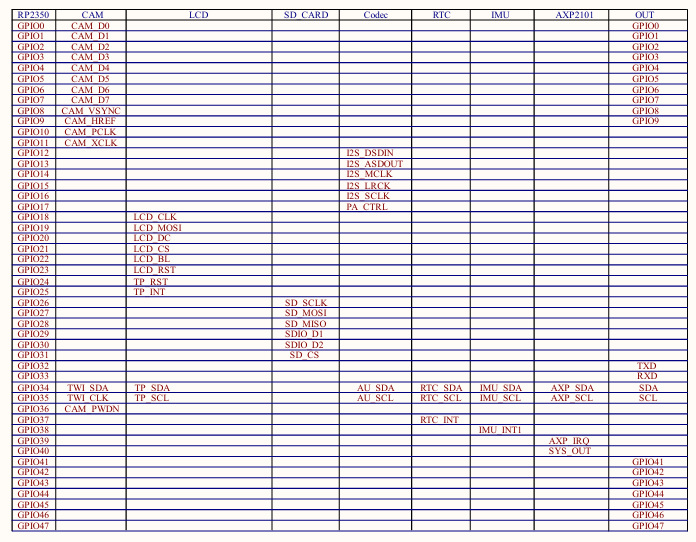
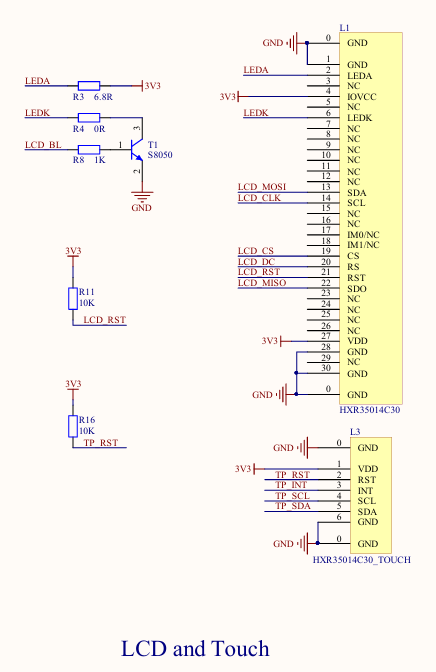
In the table of RP2350 pins, LCD column, MISO is not assigned. The display has SDO (MISO) shown but it does not appear to be connected to the RP2350.
Volhout Guru Joined: 05/03/2018 Location: NetherlandsPosts: 6150
DIM of a user-defined TYPE could fail with Not enough memory for 0 bytes, reported against a line that was perfectly correct, and adding an unrelated statement elsewhere in the program made it come and go. The IF/END IF jump table and the table of TYPE definitions both live in the BASIC heap, and clearing that heap did not tell either of them, so the jump table went on to release memory that by then held a TYPE definition and was rebuilt over the top of it. Found from a report by G@bor. It is not new to this release - it needed a particular arrangement of memory to show itself.
The first flash write after a power-on now waits a second for the supply to settle. The boot counter is written to A: early in start-up, and on a board whose 3.3 V rail sits close to the flash chip's minimum that write could reach the wrong sector, leaving a board that booted once more and then not at all. Only a cold start waits; a reset button or CPU RESTART does not.
MM.VER tells release candidates apart. RC1 reads 6.040051 and RC0 reads 6.040050. Every RCn used to read a bare 6.04, so a board you had just reflashed looked identical to one you had not. PLAY BBC SOUND queues 16 notes per channel instead of 8, and MM.INFO(BBC BUFFER [channel]) reports how many more notes a channel will take without waiting. With no channel it answers for the emptiest of the four, which is the figure that is safe whichever channel comes next. Out of memory now names the size, as in Not enough memory for 16000008 bytes. The three earlier messages - Not enough PSRAM memory, Not enough Heap memory and Not enough System Heap memory - have become this one.
LIBRARY LOAD says a source file is empty rather than reporting it as missing.
A drive format requested during start-up is no longer repeated by an unrelated OPTION PLATFORM change afterwards.
On the WiFi builds, a full connection table no longer writes past the end of the connection arrays.
Writes to the A: drive are bounded at run time, so a bad block number can no longer become an erase at a computed address.
terekgabor Senior Member Joined: 02/01/2026 Location: HungaryPosts: 140
Thank you for continuing to support MMBasic, particularly for PicoCalc.
I've been playing with getting Weather from OpenWeatherMap. I noticed when my WiFi signal is weak, and the connection time's out, my Basic program exits with an error message, then a few seconds later I see a register dump and the CPU restarts.
All works fine if there is no timeout.
I was wondering if PicoMite might be receiving the data late, trying to store the data into my buffer, but since the program crashed, maybe the buffer is gone.
Whatever the problem, is this something which can be fixed? (besides me getting a stronger WiFi signal)
thanks .....Brian
terekgabor Senior Member Joined: 02/01/2026 Location: HungaryPosts: 140
Posted: 04:16pm 23 Sep 2026
Copy link to clipboard
Print this post
Hello Peter!
I tested, the problem has gone. Thanks again!
G@bor
matherp Guru Joined: 11/12/2012 Location: United KingdomPosts: 11928
Posted: 04:43pm 23 Sep 2026
Copy link to clipboard
Print this post
Briano: Thanks for the report. I suspect your diagnosis is correct. I'll have a look at it and try and get a fix into the next release candidate
ville56 Guru Joined: 08/06/2022 Location: AustriaPosts: 623
Posted: 12:42pm 24 Sep 2026
Copy link to clipboard
Print this post
I think I know what the reason is:
I am also using a hw-config without MISO (data from display to cpu) connected. When using the cursor, MMBasic seems to read data from the display hardware via MISO, for whatever reason. If MISO is not connected, it is read as all ones and this results in a white patch. Tried it with MISO on the pico side tied to GND and the patch was black (all zero).
So the artefact is because MISO is internally used but not connected properly or not connected at all.
Gerald 73 de OE1HGA, Gerald
matherp Guru Joined: 11/12/2012 Location: United KingdomPosts: 11928
Posted: 01:33pm 24 Sep 2026
Copy link to clipboard
Print this post
Precisely so, without miso nothing involving reading the display framebuffer can work. BLIT, transparent text, cursor and probably more

 Notice. New forum software under development. It's going to miss a few functions and look a bit ugly for a while, but I'm working on it full time now as the old forum was too unstable. Couple days, all good. If you notice any issues, please contact me.


 Print this post