Notice. New forum software under development. It's going to miss a few functions and look a bit ugly for a while, but I'm working on it full time now as the old forum was too unstable. Couple days, all good. If you notice any issues, please contact me.
Turtle graphics — a Turtle class (MMBasic TURTLE): movement/pen/heading, arcs, Béziers, circles, filled polygons, a state stack.
Bitmap fonts — the full set of nine MMBasic fonts (8×12 up to 32×50). hdmi.text(s, x, y, fg, bg, scale, font), hdmi.fonts(), and Display.text(..., font=, scale=).
GUI toolkit (pcgui) — the complete MMBasic GUI control set as Python objects: caption, frame, button, switch, checkbox, radio, LED, gauge, bar gauge, slider, text/number box, display box, spinner, list box, format box, and area. Driven by a USB mouse or touch panel, with an on-screen keyboard/keypad for touch text entry and global touch hooks (the GUI INTERRUPT TouchDown/TouchUp equivalent). Flicker-free incremental gauges/sliders.
Tile maps (TileMap) — scrolling tile-map backgrounds with a fast C render loop (hdmi.tilemap), tile attributes and collision, and single-tile drawing (blit_tile). Ships with a Breakout game demo (tests/breakout.py) ported from MMBasic.
File manager — fm() — a dual-panel file manager (MMBasic FM). Two panes side by side: Tab / ←→ switch panes, arrows navigate, Enter opens by type (.py runs, audio plays, images show, text views), and C copy / M move between the panes. Plus edit (pye), delete, rename, mkdir, and audio controls. Incremental redraw keeps it snappy; it restores the video mode after a program changes it.
Plotting — plot() — one-call plotting on the screen for maths/science: a list, several series, or a function over a range; line / scatter / bar, autoscaled with axes and range labels.
Game-loop timing — pcgame.Clock — a drift-free fixed-cadence frame clock (MMBasic SYNC): tick() holds an absolute deadline so animation runs at a steady rate with no drift, returns dt for frame-rate-independent motion, and tracks .fps (or vsync=True to lock to the display refresh).
Maths helpers — pcmath — the MMBasic MATH verbs that ulab doesn't already cover: quaternions, 3-D vectors, DSP (window / sinc / crossings / power spectrum), correlation, chi-square, and a PID controller. (Statistics, linear algebra, FFT and complex are in ulab + cmath.)
autosave("file") — capture what you paste or type at the console straight into a file (MMBasic AUTOSAVE) — the frictionless way to get a program onto the board with no XMODEM or SD-card shuffling. Ctrl-Z saves. Edited 2026-07-15 21:22 by matherp
matherp Guru Joined: 11/12/2012 Location: United KingdomPosts: 11881
cls() — clear the console screen (MMBasic CLS). fm multi-select — Space selects several files (shown yellow, counted in the status line); C/M/D copy, move or delete the whole selection. Plus a guard: copying when both panes show the same directory is refused (it would have truncated the source). Readable tracebacks from run() — errors now report File "prog.py", line N instead of <string>. console("none") — no console output anywhere and no blinking cursor over full-screen graphics; input still works, console() restores. DS3231 daily alarm — ds3231.set_alarm(h, m), alarm_fired(), clear_alarm(), alarm_off(), alarm_pin() (INT wired to GP32). Survives resets — it lives in the battery-backed chip. pccursor — a visible mouse pointer (MMBasic GUI CURSOR): save-under sprite, ARROW/CROSS shapes; pcgui shows and refreshes it automatically when a mouse is present. Manual and development-notes updates throughout (auto-run, import paths, hardware alarm, cursor, plus a fix to the GUI skeleton example).
matherp Guru Joined: 11/12/2012 Location: United KingdomPosts: 11881
Coming tomorrow, fully functional PC emulator for Micropython on the Pico Computer 3
New in v0.9
3D engine — draw3d — MMBasic's DRAW3D ported as a module: quaternion-rotated polyhedra with backface culling, painter depth-sorting, per-face colours/fills/flags/lighting, and hidden-line rendering (depthmode=2, the z-buffer wireframe mode — the Elite look). Demos: tests/football.py (bouncing truncated icosahedron), tests/elite.py and tests/cobra.py (hidden-line wireframe ships). hdmi.RGB640_4 — 640×480 in 16 colours, the fast game mode: the 150 KB framebuffer is half the video SRAM, so hdmi.create()'s off-screen F buffer takes the other half. Double-buffered 3D now runs faster than MMBasic on the same hardware. RGB320 fast double-buffering — hdmi.create() called before hdmi.layer() claims the second half of video SRAM for the F buffer (first come, first served; layer() then errors until close("F"); call layer() first and both coexist as before). Turtle pattern fills — t.fillpattern(0..31) (fp), MMBasic's 32 8×8 fill patterns, plus a fix for the speckled border artefact on filled shapes; hdmi.polyfill() exposes the scanline pattern fill to everything else. pcmath.AHRS — Mahony and Madgwick sensor fusion (MMBasic MATH verbatim) for IMU work: feed gyro/accel (/mag), get quaternion or Euler angles. Overclock flash fix — screen(..., 315) / screen(..., 378) no longer hard-hangs: the post-write XIP re-entry now respects the flash's limits at every supported CPU clock (PICO_FLASH_SPI_CLKDIV=4, MMBasic's setting). 4-bpp modes corrected — all C drawing paths now share framebuf's GS4_HMSB nibble order; RGB1024 text and graphics render with columns the right way round. Console robustness — Ctrl-C during a dupterm write no longer kills the screen console; run() always restores drawing (and the console) to the visible display when a program ends, however it ends — no more "dead REPL" after interrupting a double-buffered program. Performance — the 3D engine and drawing core use single-precision hardware FPU arithmetic and horizontal-span fills throughout (MMBasic parity). pye editor sizing — the editor takes its screen size from the active console, fixing the bottom line in RGB320. Manual and development notes updated throughout. Edited 2026-07-18 07:07 by matherp
okwatts Regular Member Joined: 27/09/2022 Location: CanadaPosts: 88
Posted: 10:47pm 17 Jul 2026
Copy link to clipboard
Print this post
Deleted operator error! Edited 2026-07-18 09:00 by okwatts
matherp Guru Joined: 11/12/2012 Location: United KingdomPosts: 11881
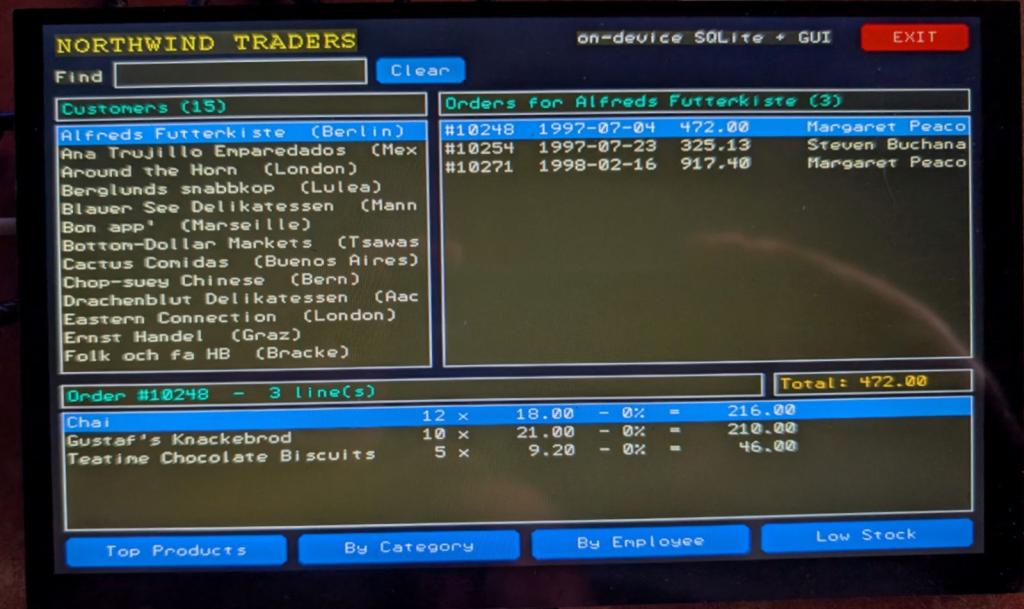
On-device SQLite — import usqlite — a full SQLite 3.47 database engine is now built into the firmware. usqlite.connect("/data.db") gives you real SQL — tables, indexes, transactions, parameterised queries and cursors — with the database an ordinary file on the flash disk (/) or SD card (/sd) that survives a power-cycle. SQLite runs in the board's 8 MB PSRAM heap, so non-trivial queries are practical. Hardware-tested (create/insert/select, REAL round-trip, persistence across reconnect). The PC emulator has it too, so import usqlite behaves identically there. See User Manual §17.
Simple test program for sql
import usqlite, os
DB = "/sqltest.db" try: os.remove(DB) except OSError: pass
print("VER", usqlite.sqlite_version)
con = usqlite.connect(DB)
# executemany() usqlite-style: one multi-statement string, no params con.executemany( "BEGIN TRANSACTION;" "CREATE TABLE readings(id INTEGER PRIMARY KEY, name TEXT, temp REAL);" "COMMIT;")
# parameterized execute() -> exercises the patched float bind path (REAL param) for name, temp in (("alice", 3.14), ("bob", 2.71), ("carol", 42.0)): con.execute("INSERT INTO readings(name, temp) VALUES (?, ?)", (name, temp))
with con.execute("SELECT id, name, temp FROM readings ORDER BY id") as cur: for row in cur: print("ROW", row[0], row[1], row[2])
with con.execute("SELECT COUNT(*), SUM(temp) FROM readings") as cur: r = list(cur)[0] n, total = r[0], r[1] print("AGG", n, total) con.close()
# reopen -> proves on-disk persistence + a float parameter in WHERE con2 = usqlite.connect(DB) names = [] with con2.execute("SELECT name FROM readings WHERE temp > ? ORDER BY name", (3.0,)) as cur: for row in cur:
ok = (usqlite.sqlite_version == "3.47.0" and n == 3 and abs(total - 47.85) < 1e-6 and names == ["alice", "carol"]) print("PEAK", usqlite.mem_peak()) print("RESULT", "PASS" if ok else "FAIL")
USB gamepad — gamepad() — plug a USB game controller into the host port and read it like MMBasic's DEVICE(GAMEPAD): gamepad("LX"/"LY"/"RX"/"RY") analog sticks, gamepad("B") button bitmap (test with & gamepad.A, gamepad.START, …), gamepad("H") d-pad/hat, the analog triggers, and the PS4 gyroscope/accelerometer. Xbox, PlayStation 3/4 and a table of common generic HID pads decode out of the box; gamepad.configure() teaches it an unrecognised controller (gamepad.monitor() helps discover one). Hardware-tested with a generic pad and a DualShock 3.
USB serial (CDC host) — USBSerial — a USB-serial adapter (FTDI, CP2102, CH340, or a native-USB device such as an Arduino) plugged into the host port becomes a UART-like object: exactly the read/readline/readinto/write/flush/any of machine.UART, plus connected() and on_change() for hot-plug. Up to four at once. Hardware-tested round-trip against a second RP2 running MMBasic.
hdmi.RGB320_8 — 320×240 in 256 colours, pixel-doubled to 640×480. One buffer is only a quarter of the video SRAM, so the display, the overlay layer and the off-screen create() buffer all fit in fast SRAM at once — the only mode offering an overlay and a fast double buffer together.
Wi-Fi password security — the saved Wi-Fi password is now scrambled and tied to this specific board (not readable at a glance in settings.json, and useless if copied to another board), and wifi("SSID", "pw", save=False) connects without saving it.
Fixes — a composite keyboard's extra HID interface (e.g. the Raspberry Pi keyboard's media keys) no longer shows up as a phantom gamepad; RGB640_4 vsync timing; the cosmetic hardware/powman.h build error on RP2350; and the emulator now builds cleanly from a fresh clone. Built against pico-sdk 2.3.0 with an upstream MicroPython sync.
Manual and development notes updated throughout. Edited 2026-07-22 20:15 by matherp
lizby Guru Joined: 17/05/2016 Location: United StatesPosts: 3881
LeoNicolas Guru Joined: 07/10/2020 Location: CanadaPosts: 625
Posted: 01:40pm 22 Jul 2026
Copy link to clipboard
Print this post
Hi Peter
Do you accept the following python syntax on the pico 3?
from aw.engine import Engine
where aw is a directory, engine is a engine.py file and Engine is a class
I could not find anything regarding that in the book.
I'm using the pc emulator on linux Edited 2026-07-22 23:40 by LeoNicolas
matherp Guru Joined: 11/12/2012 Location: United KingdomPosts: 11881
Posted: 02:13pm 22 Jul 2026
Copy link to clipboard
Print this post
AFAIK You can't specify a directory in the import command. To use a non-standard directory you need to include it in the path import sys sys.path.append('/path/to/your/dir')
LeoNicolas Guru Joined: 07/10/2020 Location: CanadaPosts: 625
Posted: 02:42pm 22 Jul 2026
Copy link to clipboard
Print this post
Thank you Peter
I'm learning the differences between Python and MicroPython. We always should reference the MicroPython documentation.
From the MicroPython documentation:
MicroPython doesn’t support namespace packages split across filesystem.
Cause: MicroPython’s import system is highly optimized for simplicity, minimal memory usage, and minimal filesystem search overhead.
Workaround: Don’t install modules belonging to the same namespace package in different directories. For MicroPython, it’s recommended to have at most 3-component module search paths: for your current application, per-user (writable), system-wide (non-writable).
lizby Guru Joined: 17/05/2016 Location: United StatesPosts: 3881
Posted: 02:47pm 22 Jul 2026
Copy link to clipboard
Print this post
To answer my question: flashing this new firmware doesn't wipe the flash drive.
(As the manual says, but I hadn't gotten that far.)
matherp Guru Joined: 11/12/2012 Location: United KingdomPosts: 11881
Posted: 06:27pm 22 Jul 2026
Copy link to clipboard
Print this post
scruss Senior Member Joined: 20/09/2021 Location: CanadaPosts: 116
Posted: 09:11pm 22 Jul 2026
Copy link to clipboard
Print this post
It doesn't, but I'd still recommend a backup of your board's filesystem first.
Talking of that, (and this is in Peter's manual now): the /flash filesystem is case sensitive. The SD card filesystem is not (it's plain old FAT) Edited 2026-07-23 07:13 by scruss
lizby Guru Joined: 17/05/2016 Location: United StatesPosts: 3881

 Notice. New forum software under development. It's going to miss a few functions and look a bit ugly for a while, but I'm working on it full time now as the old forum was too unstable. Couple days, all good. If you notice any issues, please contact me.


 Print this post