Notice. New forum software under development. It's going to miss a few functions and look a bit ugly for a while, but I'm working on it full time now as the old forum was too unstable. Couple days, all good. If you notice any issues, please contact me.
matherp Guru Joined: 11/12/2012 Location: United KingdomPosts: 11773
Posted: 08:28am 15 Aug 2026
Copy link to clipboard
Print this post
I hope you are using the tilemap engine? It is absolutely made for this sort of game.
Martin H. Guru Joined: 04/06/2022 Location: GermanyPosts: 1517
Posted: 09:36am 15 Aug 2026
Copy link to clipboard
Print this post
Here’s an entertaining documentary about the making of Lemmings. Russell Kay is a little difficult for a non-native speaker to understand'no comment
Martin H. Guru Joined: 04/06/2022 Location: GermanyPosts: 1517
Posted: 01:43pm 15 Aug 2026
Copy link to clipboard
Print this post
I haven't experimented with the tilemap yet. But using Flash load image and Blit Flashfunction saves you from having to create a library and so on.
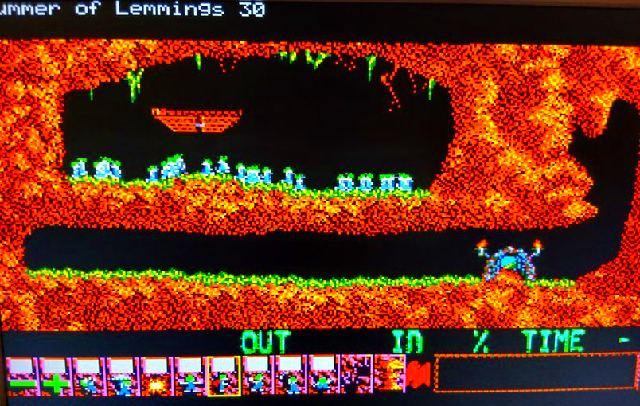
In this test, 75 sprites run at the same time with relatively little flickering at 252 MHz. Flash load image The path refers to the “Sprites” folder from my last post
'instead of 3, insert the Number of a free flash Slot here: Flash load image 3,"Sprites/Lemming.bmp",o MODE 2:CLS :Input "Nummer of Lemmings ",snum As integer Dim LX(snum),ly(snum) For nr=1 To snum LX(nr)=Int(Rnd*304) ly(nr)=Int(Rnd*224) Next Do For y=0 To 1 For nr=0 To 15 FRAMEBUFFER wait CLS For s=1 To snum Blit Flash 3,n,nr*16,64+(y*16),lx(s),ly(s),16,16,9 Next Pause 40 Next Next Loop
It looks very promising btw, I found the Lemmings Level List and the complete Music cheers Martin Edited 2026-08-16 21:06 by Martin H.'no comment
Martin H. Guru Joined: 04/06/2022 Location: GermanyPosts: 1517
Martin H. Guru Joined: 04/06/2022 Location: GermanyPosts: 1517
Posted: 03:47pm 19 Aug 2026
Copy link to clipboard
Print this post
That would be the obvious solution, but then there are issues with the RP2040 Pico – you’d need an additional keyboard/Gamepad controller. Feel free to tweak the HUD – I’m not entirely happy with it myself. I only included it because of the screen layout. This is what it looks like on the Amiga: Edited 2026-08-20 01:48 by Martin H.'no comment
Volhout Guru Joined: 05/03/2018 Location: NetherlandsPosts: 6048
Posted: 04:05pm 19 Aug 2026
Copy link to clipboard
Print this post
PS2 mouse works on pico. But we can also include Wii or nes controller.
Martin H. Guru Joined: 04/06/2022 Location: GermanyPosts: 1517
Posted: 07:02pm 19 Aug 2026
Copy link to clipboard
Print this post
This is what it might look like 'no comment
Volhout Guru Joined: 05/03/2018 Location: NetherlandsPosts: 6048
Posted: 09:46am 20 Aug 2026
Copy link to clipboard
Print this post
Hi Martin,
The new HUD is a major improvement. I think your demo is impressive, but it will be near impossible to use it as a basis for a game becuase memory.
You use both framebuffer and framebuffer layer. That leaves 37k free heap , from which 28k will be reserved for variables. Hence only 9kbyte to work with.
Currently the game screen is an image, and as such you could try to make a game. Then 9kb would be good enough. But when you start using the tiles for the game screen, you need an array for just the game screen, and your 9kb is gone.
It would be much easier when you use either L or F buffers, or design the game around graphical game screens. If that is at all possible. I haven't thought through it far enough to see if this is possible. Digging holes would not be a problem, explosions would not be a problem (dirt gone..is dirt gone).
Maybe it can be done... complexity would be if a game screen is larger than visual area. When scrolling through modified landscape (dug holes that scroll outside the visible screen, must re-apear when you scroll back). I think it could only be done when each level constrains to visible area.
matherp Guru Joined: 11/12/2012 Location: United KingdomPosts: 11773
Posted: 09:55am 20 Aug 2026
Copy link to clipboard
Print this post
Martin H. Guru Joined: 04/06/2022 Location: GermanyPosts: 1517
Posted: 10:13am 20 Aug 2026
Copy link to clipboard
Print this post
Hello Peter, Thanks again for the tip. At the moment, I only have the levels as PNG files (see the link above); first I need to find (or write a program to find) matching elements and use them to create a tilemap for the levels. So I’m still in the preparation stage.'no comment
Martin H. Guru Joined: 04/06/2022 Location: GermanyPosts: 1517
Posted: 10:32am 20 Aug 2026
Copy link to clipboard
Print this post
Hi Harm,
We can do without framebuffer F; that was just to get it up and running quickly. Framebuffer WAIT :CLS and then redrawing the sprites on Layer L works for up to about 60 sprites on the screen @252 MHz without noticeable flickering (And even if a sprite does happen to flicker, that’s not really a problem, in my opinion.). In normal gameplay, an info card appears before each level, describing the level. That is precisely when there would be enough time to reload the elements and tilemap for the next level. In the game itself, the rules for the individual Lemming types, which the programme processes, are only ever needed up to the next step. So, for example, if a ‘Walker’ realises it no longer has any ground beneath it, it would fall (this is entered as the object type for this sprite, and the y-position is used to determine, upon ‘impact’, whether the Lemming survives or might even have a parachute). etc.
Edited 2026-08-20 20:48 by Martin H.'no comment
joker Regular Member Joined: 06/02/2024 Location: GermanyPosts: 52
Posted: 11:15am 20 Aug 2026
Copy link to clipboard
Print this post
Hello, I know CMM2 users are a minority here but we are still alive
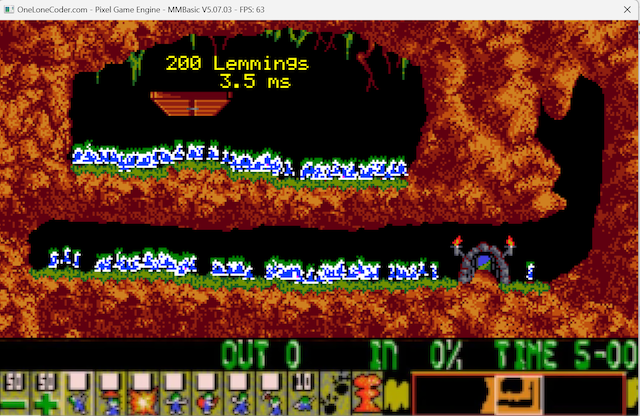
Here is the CMM2 version of Martins little Lemmings demo: CMM2Lemmings.zip
The demo runs resonable with 200 Lemmings. I had it run with 1500 Lemmings, but the frame rate drops a bit .
Cheers Matthias
Martin H. Guru Joined: 04/06/2022 Location: GermanyPosts: 1517
Posted: 12:35pm 20 Aug 2026
Copy link to clipboard
Print this post
Nice, You’ve used the full-colour PNGs Here is a little Video of the Pico Demo I don’t have CMM2, but with a few minor tweaks, your script will also run in mmb4windows
'MMB4W OPTION BASE 0 OPTION EXPLICIT OPTION DEFAULT NONE
Lem(0,LEM_X) =280 Lem(0,LEM_Y) =120 Lem(0,LEM_Dir) =int(RND*2) Lem(0,LEM_Anim)=int(RND*8) for nr=1 to LEMMINGS_NUM-1 Lem(nr,LEM_X) =36+int(Rnd*166) Lem(nr,LEM_Y) =choice(nr<LEMMINGS_NUM/2,50,120) Lem(nr,LEM_Dir) =int(RND*2) Lem(nr,LEM_Anim)=int(RND*8) next
DIM Integer lx,ly,di,an DIM Float tim,T,D
PAGE write PAGE_BUFFER do tim=TIMER+60 : T=TIMER
PAGE copy PAGE_BACKGND to PAGE_BUFFER Text 120,18,str$(LEMMINGS_NUM)+" Lemmings","C",7,,rgb(yellow) Text 120,27,str$(D,4,1)+" ms","C",7,,rgb(yellow) for nr=0 to LEMMINGS_NUM-1 lx=Lem(nr,LEM_X) : ly=Lem(nr,LEM_Y) : di=Lem(nr,LEM_Dir) : an=Lem(nr,LEM_Anim) blit (di<<7)+(an<<4),0,lx,ly,16,16,PAGE_SPRITES,&B100 an=(an+1) mod 8 PAGE write PAGE_BACKGND if di Then inc lx,-1 : if Pixel(lx+4,ly+8)<> col_BLK then di=0 else inc lx : if Pixel(lx+12,ly+8)<> col_BLK then di=1 end If
inc ly,choice((Pixel(lx+8,ly+16)<> col_BLK),-1,1) Lem(nr,LEM_X)=lx : Lem(nr,LEM_Y)=ly : Lem(nr,LEM_Dir)=di : Lem(nr,LEM_Anim)=an PAGE write PAGE_BUFFER next D=(TIMER-T) PAGE copy PAGE_BUFFER to PAGE_DISPLAY,B
do : loop until TIMER>=tim loop until keydown(0)>0

 Notice. New forum software under development. It's going to miss a few functions and look a bit ugly for a while, but I'm working on it full time now as the old forum was too unstable. Couple days, all good. If you notice any issues, please contact me.


 Print this post






 .
.