matherp
Guru

Joined: 11/12/2012
Location: United KingdomPosts: 11882 |
| Posted: 06:14pm 11 Mar 2026 |
 Copy link to clipboard Copy link to clipboard |
 Print this post |
|
By request, attached is a sort of proforma example platform game programmed using the TILEMAP command. It is fully functional (HDMI or RP2350VGA) and extensively commented so should be useful as a starting point for any sort of platform type game.
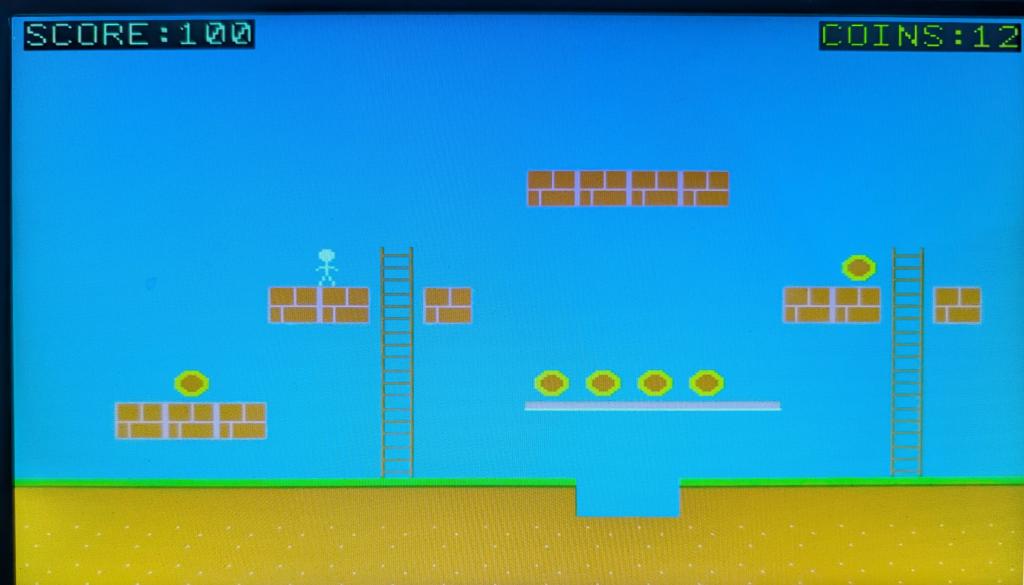
'=============================================
' PLATFORM - A Tilemap-Based Platform Game
'
' A complete reference implementation showing
' how to build a side-scrolling platform game
' using the TILEMAP engine. Techniques covered:
'
' - Procedural tileset generation (drawing
' tiles at runtime, saving as BMP, loading
' into FLASH for the TILEMAP engine)
' - Scrolling camera across a world wider
' than the screen (map is 2x screen width)
' - Tile-based collision detection using
' TILEMAP(COLLISION) with attribute masks
' - Gravity, jumping, and ladder climbing
' - One-way platforms (stand on top, pass
' through from below)
' - Coin collection via TILEMAP SET to
' replace tiles at runtime
' - Sprite animation using TILEMAP SPRITE
' SET to swap between tile frames
' - Double-buffered rendering with
' FRAMEBUFFER for flicker-free display
'
' Game Structure:
' 1. GenerateTileset draws tiles to screen,
' saves as BMP, loads into FLASH
' 2. Title screen waits for input
' 3. TILEMAP CREATE builds the map from DATA
' 4. Main loop: Input -> Physics -> Collision
' -> Animation -> Draw -> Repeat
' 5. Win/Lose screens loop back or exit
'
' Controls: Left/Right arrows to move
' Up arrow to jump / climb ladder
' Down arrow to descend ladder
' A = jump diagonally left
' S = jump diagonally right
' Q to quit
'
' Requires: MODE 2 (320x240 RGB121), SD card
'=============================================
' OPTION EXPLICIT forces all variables to be
' declared with DIM before use - catches typos.
OPTION EXPLICIT
' OPTION BASE 0 means arrays and DATA indices
' start at 0. Tile index 0 = empty/transparent.
OPTION BASE 0
' MODE 2 sets 320x240 resolution with RGB121
' (4-bit colour, 16 colours). This is the most
' common mode for PicoMite game development.
MODE 2
' ---- Display constants ----
' These match MODE 2 resolution. Used to
' calculate camera bounds and HUD positions.
CONST SCR_W = 320
CONST SCR_H = 240
' ---- Tile dimensions ----
' Each tile is 16x16 pixels. The tileset image
' is arranged in a grid with TPR tiles per row.
' TILEMAP CREATE uses these to slice the BMP
' into individual tile images.
CONST TW = 16 ' tile width in pixels
CONST TH = 16 ' tile height in pixels
CONST TPR = 8 ' tiles per row in tileset image
' ---- Map dimensions ----
' The map is wider than the screen to enable
' horizontal scrolling. 40 cols x 16px = 640px
' = exactly 2 screen widths. The camera slides
' across this wider world to follow the player.
' Height is 15 rows x 16px = 240px = 1 screen.
CONST MCOLS = 40 ' map columns (2x screen)
CONST MROWS = 15 ' map rows (1x screen)
' ---- Tile indices ----
' Each tile type has a unique index (1-based).
' Index 0 is reserved for empty/transparent.
' Tiles 1-8 appear in the map DATA. Tiles 9-12
' are used only for sprite animation frames
' (never placed on the map itself).
CONST T_EMPTY = 0 ' empty/transparent tile
CONST T_GRASS = 1 ' solid ground with grass top
CONST T_BRICK = 2 ' solid brick platform
CONST T_LADDER = 3 ' climbable ladder
CONST T_COIN = 4 ' collectible coin
CONST T_SKY = 5 ' background sky (passable)
CONST T_DIRT = 6 ' solid underground fill
CONST T_PLAYER = 7 ' player standing pose (sprite)
CONST T_PLAT = 8 ' one-way platform (stand on top)
CONST T_WALK1 = 9 ' walk frame 1 (sprite only)
CONST T_WALK2 = 10 ' walk frame 2 (sprite only)
CONST T_CLIMB1 = 11 ' climb frame 1 (sprite only)
CONST T_CLIMB2 = 12 ' climb frame 2 (sprite only)
' ---- Attribute bits ----
' Each tile type has a bitmask of attributes,
' loaded via TILEMAP ATTR. TILEMAP(COLLISION)
' tests a rectangular area against a specific
' attribute bit, returning >0 if any tile in
' that area has the bit set. Using separate
' bits allows a tile to have multiple properties
' (e.g. a tile could be both solid AND a ladder
' if needed). We test with AND in code:
' IF (attr AND A_SOLID) THEN ...
CONST A_SOLID = &b0001 ' bit 0: blocks movement
CONST A_LADDER = &b0010 ' bit 1: climbable
CONST A_COIN = &b0100 ' bit 2: collectible
CONST A_PLAT = &b1000 ' bit 3: one-way platform
' ---- RGB121 colours ----
' MODE 2 uses RGB121 encoding: 1 bit red, 2
' bits green, 1 bit blue = 16 possible colours.
' The RGB() function maps 24-bit values to the
' nearest RGB121 colour. Defining named colour
' constants improves readability throughout.
CONST C_BLACK = RGB(0,0,0)
CONST C_RED = RGB(255,0,0)
CONST C_YELLOW = RGB(255,255,0)
CONST C_GREEN = RGB(0,255,0)
CONST C_BLUE = RGB(0,0,255)
CONST C_WHITE = RGB(255,255,255)
CONST C_GREY = RGB(128,128,128)
CONST C_CYAN = RGB(0,255,255)
CONST C_BROWN = RGB(128,128,0)
CONST C_SKY = RGB(0,128,255)
CONST C_DGREEN = RGB(0,128,0)
CONST C_ORANGE = RGB(255,128,0)
' ---- Game state ----
' Positions use "world coordinates" (pixels
' within the full 640px-wide map), not screen
' coordinates. The camera offset converts world
' to screen position for rendering.
' Float variables (!) give sub-pixel precision
' for smooth movement at fractional speeds.
DIM score, coins_left
DIM px!, py! ' player world position (float for sub-pixel)
DIM vx!, vy! ' player velocity (pixels/frame)
DIM cam_x ' camera X offset in world pixels
DIM on_ground ' 1 if standing on solid surface
DIM on_ladder ' 1 if player centre overlaps ladder tile
DIM k$ ' current keypress from INKEY$
DIM hit_t, hit_a ' collision query temporaries
DIM tcol, trow ' tile grid coordinate temporaries
DIM new_px!, new_py! ' proposed position before collision check
DIM i ' general loop variable
DIM anim_count ' frame counter for animation timing
DIM anim_tile ' current tile index for sprite display
DIM walk_timer ' countdown: frames to show walk pose
DIM climb_timer ' countdown: frames to show climb pose
' ---- Physics constants ----
' These control the "feel" of the game. Adjust
' to taste: higher GRAVITY = heavier; higher
' JUMP_VEL (more negative) = higher jumps;
' higher MOVE_SPEED = faster walking.
' All values are in pixels per frame.
CONST GRAVITY! = 0.3 ' downward acceleration per frame
CONST JUMP_VEL! = -4.5 ' initial upward velocity on jump
CONST MOVE_SPEED! = 2.0 ' horizontal walk speed
CONST CLIMB_SPEED! = 1.5 ' vertical climb speed on ladders
CONST MAX_FALL! = 5.0 ' terminal velocity (max fall speed)
' Player collision box: narrower than the tile
' to allow the player to slip between gaps and
' feel less "sticky" against walls. PW < TW
' means 2px margin on each side of the sprite.
CONST PW = 12 ' collision box width (< TW)
CONST PH = 16 ' collision box height (= TH)
' Animation hold timers: INKEY$ only returns a
' character when a key repeat fires, leaving
' most frames with k$="". Without timers the
' sprite flickers to standing between repeats.
' These counters hold the walk/climb pose for
' N frames after each keypress, bridging the
' gap between INKEY$ repeat events.
CONST WALK_FRAMES = 10 ' frames to sustain walk pose
CONST CLIMB_FRAMES = 10 ' frames to sustain climb pose
' ---- Derived constants ----
' World width in pixels and maximum camera
' offset. Camera is clamped to [0..MAX_CAM]
' so the viewport never shows beyond the map.
CONST WORLD_W = MCOLS * TW ' 640 pixels
CONST MAX_CAM = WORLD_W - SCR_W ' 320 pixels
' ============================================
' Setup: Tileset Generation Pipeline
' ============================================
' Step 1: Draw all tile graphics to the screen
' using LINE, BOX, CIRCLE, PIXEL.
' Step 2: SAVE IMAGE captures the tileset area
' to a BMP file on the SD card.
' Step 3: FLASH LOAD IMAGE stores the BMP into
' FLASH memory slot 1. The O flag means
' "overwrite" if the slot is already used.
' Once in FLASH, TILEMAP CREATE can use
' it without needing the SD card again.
PRINT "Generating tileset..."
GenerateTileset
FLASH LOAD IMAGE 1, "platform_tiles.bmp", O
' Create a framebuffer for double-buffered
' rendering. We draw to framebuffer F (off-screen)
' then copy to N (on-screen) each frame. This
' eliminates flicker from partial draws.
FRAMEBUFFER CREATE
' ============================================
' Title Screen
' ============================================
' Draw to the framebuffer (F), then copy to
' the display (N) in one operation. This
' pattern is used everywhere for flicker-free
' rendering.
TitleScreen:
FRAMEBUFFER WRITE F
CLS C_BLACK
TEXT SCR_W\2, 40, "PLATFORM", "CM", 7, 2, C_GREEN
TEXT SCR_W\2, 100, "Arrow keys to move", "CM", 1, 1, C_WHITE
TEXT SCR_W\2, 120, "UP to jump or climb", "CM", 1, 1, C_WHITE
TEXT SCR_W\2, 140, "A=jump-left S=jump-right", "CM", 1, 1, C_WHITE
TEXT SCR_W\2, 160, "DOWN to descend ladders", "CM", 1, 1, C_WHITE
TEXT SCR_W\2, 180, "Collect all coins!", "CM", 1, 1, C_YELLOW
TEXT SCR_W\2, 200, "Press SPACE to start", "CM", 1, 1, C_CYAN
FRAMEBUFFER COPY F, N
DO : k$ = INKEY$ : LOOP UNTIL k$ = " " OR UCASE$(k$) = "Q"
IF UCASE$(k$) = "Q" THEN GOTO Cleanup
' Flush keyboard buffer before game starts
DO WHILE INKEY$ <> "" : LOOP
' ============================================
' New Game - Initialise TILEMAP and state
' ============================================
score = 0
' Close any previous tilemap (needed when
' restarting after win/lose via GOTO TitleScreen).
TILEMAP CLOSE
' TILEMAP CREATE arguments:
' mapdata = DATA label containing tile indices
' 1 = FLASH image slot for the tileset
' 1 = tilemap ID (for multi-tilemap games)
' TW, TH = tile dimensions in pixels
' TPR = tiles per row in the tileset image
' MCOLS = map width in tiles
' MROWS = map height in tiles
TILEMAP CREATE mapdata, 1, 1, TW, TH, TPR, MCOLS, MROWS
' TILEMAP ATTR loads the attribute bitmask for
' each tile type. The DATA label "tileattrs"
' provides one value per tile type (1-based).
' The third argument (12) is the number of entries.
TILEMAP ATTR tileattrs, 1, 12
' Count coins in the map by scanning every tile.
' This uses the two-step query pattern:
' 1. TILEMAP(TILE id, x, y) returns the tile
' index at world pixel coordinates.
' 2. TILEMAP(ATTR id, tileIndex) returns the
' attribute bitmask for that tile type.
' Note: TILEMAP(ATTR) takes a tile INDEX, not
' pixel coordinates. Always check tile > 0 first
' since tile 0 (empty) has no attributes.
coins_left = 0
FOR trow = 0 TO MROWS - 1
FOR tcol = 0 TO MCOLS - 1
hit_t = TILEMAP(TILE 1, tcol * TW + 1, trow * TH + 1)
IF hit_t > 0 THEN
hit_a = TILEMAP(ATTR 1, hit_t)
IF (hit_a AND A_COIN) THEN coins_left = coins_left + 1
END IF
NEXT tcol
NEXT trow
' ---- Create player sprite ----
' TILEMAP SPRITE CREATE arguments:
' 1 = sprite ID
' 1 = tilemap ID it belongs to
' T_PLAYER = initial tile to display
' x, y = initial screen position
' The sprite moves independently of the map
' and is drawn on top by TILEMAP SPRITE DRAW.
' Start at column 2, row 11 (just above ground).
px! = 2 * TW
py! = 11 * TH
vx! = 0 : vy! = 0
on_ground = 0 : on_ladder = 0
cam_x = 0
anim_count = 0 : anim_tile = T_PLAYER
walk_timer = 0 : climb_timer = 0
TILEMAP SPRITE CREATE 1, 1, T_PLAYER, INT(px!) - cam_x, INT(py!)
' ============================================
' Main Game Loop
' ============================================
' Each iteration is one frame. The loop follows
' the standard game loop pattern:
' 1. Read input
' 2. Update physics (velocity, position)
' 3. Resolve collisions
' 4. Collect items
' 5. Update camera and animation
' 6. Render everything
' 7. Check win/lose conditions
DO
' Start each frame by directing drawing to
' the off-screen framebuffer, then clear it.
FRAMEBUFFER WRITE F
CLS C_SKY
' ---- Input ----
' INKEY$ returns one character per call from
' the keyboard buffer, or "" if no key is
' pending. Arrow keys return CHR$(128)-131.
' Limitation: INKEY$ can only report one key
' per frame, so we use A/S as combo keys for
' simultaneous jump + horizontal movement.
k$ = INKEY$
IF UCASE$(k$) = "Q" THEN GOTO Cleanup
' ---- Ladder detection ----
' Check what tile is under the player's centre
' point. If it has the A_LADDER attribute, the
' player can climb. This two-step query
' (TILE then ATTR) is the standard pattern for
' checking tile properties at a point.
hit_t = TILEMAP(TILE 1, INT(px!) + TW\2, INT(py!) + TH\2)
on_ladder = 0
IF hit_t > 0 THEN
hit_a = TILEMAP(ATTR 1, hit_t)
IF (hit_a AND A_LADDER) THEN on_ladder = 1
END IF
' ---- Horizontal movement ----
' When on ground or ladder, velocity resets to
' zero each frame (player stops when no key is
' pressed). When AIRBORNE, vx! is preserved
' from the previous frame so the player keeps
' momentum through the jump arc - this makes
' gap-jumping possible with INKEY$ input.
IF on_ground THEN vx! = 0
IF on_ladder THEN vx! = 0
' Arrow keys and A/S set horizontal velocity.
' A/S also trigger a jump (handled below),
' giving diagonal jump with a single keypress.
' walk_timer is reset on each keypress to keep
' the walking animation visible between INKEY$
' repeat events.
IF k$ = CHR$(130) THEN vx! = -MOVE_SPEED! : walk_timer = WALK_FRAMES
IF k$ = CHR$(131) THEN vx! = MOVE_SPEED! : walk_timer = WALK_FRAMES
IF LCASE$(k$) = "a" THEN vx! = -MOVE_SPEED! : walk_timer = WALK_FRAMES
IF LCASE$(k$) = "s" THEN vx! = MOVE_SPEED! : walk_timer = WALK_FRAMES
' ---- Vertical movement ----
' Two completely different physics modes:
' ON LADDER: no gravity, up/down to climb,
' A/S to jump off the ladder sideways.
' NOT ON LADDER: gravity pulls down, jump
' only when standing on ground.
IF on_ladder THEN
' Ladder mode: direct vertical control
vy! = 0
IF k$ = CHR$(128) THEN vy! = -CLIMB_SPEED! : climb_timer = CLIMB_FRAMES
IF k$ = CHR$(129) THEN vy! = CLIMB_SPEED! : climb_timer = CLIMB_FRAMES
' A/S = leap off ladder sideways (vx! was
' already set above; here we add jump velocity
' and exit ladder mode)
IF LCASE$(k$) = "a" THEN
vy! = JUMP_VEL!
on_ladder = 0
END IF
IF LCASE$(k$) = "s" THEN
vy! = JUMP_VEL!
on_ladder = 0
END IF
ELSE
' Normal physics: gravity + jump
' Jump is only allowed when on_ground.
' Up arrow = vertical jump; A/S = diagonal
' jump (vx! was already set above).
' Note: MMBasic IF does not short-circuit,
' so we nest IF checks instead of using AND.
IF k$ = CHR$(128) THEN
IF on_ground THEN
vy! = JUMP_VEL!
on_ground = 0
END IF
END IF
IF LCASE$(k$) = "a" THEN
IF on_ground THEN
vy! = JUMP_VEL!
on_ground = 0
END IF
END IF
IF LCASE$(k$) = "s" THEN
IF on_ground THEN
vy! = JUMP_VEL!
on_ground = 0
END IF
END IF
' Gravity accumulates each frame (constant
' acceleration). Terminal velocity prevents
' the player from falling unreasonably fast.
vy! = vy! + GRAVITY!
IF vy! > MAX_FALL! THEN vy! = MAX_FALL!
END IF
' ============================================
' COLLISION DETECTION
' ============================================
' Collisions use "proposed position" testing:
' 1. Calculate new position from velocity
' 2. Test the new position for overlaps
' 3. If blocked, revert to old position
' Horizontal and vertical axes are resolved
' independently to prevent diagonal sticking.
'
' TILEMAP(COLLISION id, x, y, w, h, attrMask)
' tests a rectangle at world pixel coords and
' returns >0 if any tile in that area has the
' specified attribute bits set.
' ============================================
' ---- Horizontal collision ----
new_px! = px! + vx!
' Clamp to world bounds
IF new_px! < 0 THEN new_px! = 0
IF new_px! > WORLD_W - TW THEN new_px! = WORLD_W - TW
' Check horizontal collision with solid tiles.
' Only test the LEADING EDGE of the collision
' box (1px-wide strip) in the direction of
' movement. The collision box is centred within
' the tile: offset = (TW - PW) / 2 on each side.
' The vertical range is inset by 1px top and
' bottom to avoid false positives at tile seams.
IF vx! < 0 THEN
' Moving left: test 1px strip at left edge
hit_t = TILEMAP(COLLISION 1, INT(new_px!) + (TW - PW)\2, INT(py!) + 1, 1, PH - 2, A_SOLID)
IF hit_t > 0 THEN new_px! = px! ' blocked: revert
END IF
IF vx! > 0 THEN
' Moving right: test 1px strip at right edge
hit_t = TILEMAP(COLLISION 1, INT(new_px!) + (TW + PW)\2 - 1, INT(py!) + 1, 1, PH - 2, A_SOLID)
IF hit_t > 0 THEN new_px! = px! ' blocked: revert
END IF
px! = new_px! ' commit horizontal position
' ---- Vertical collision ----
' Reset on_ground each frame; it gets set to 1
' only if we detect solid ground or a platform
' below the player's feet.
new_py! = py! + vy!
on_ground = 0
IF vy! >= 0 THEN
' FALLING / STATIONARY: test 1px strip below
' the player's feet (at new_py! + PH).
hit_t = TILEMAP(COLLISION 1, INT(px!) + (TW - PW)\2, INT(new_py!) + PH, PW, 1, A_SOLID)
IF hit_t > 0 THEN
' Snap player to the top of the tile they
' collided with. Integer division finds the
' tile row, then multiply back to get the
' pixel-aligned landing position.
trow = (INT(new_py!) + PH) \ TH
new_py! = trow * TH - PH
vy! = 0
on_ground = 1
ELSE
' No solid tile below - check one-way
' platforms (A_PLAT). These are only solid
' when the player is falling ONTO them from
' above, not when jumping up through them.
hit_t = TILEMAP(COLLISION 1, INT(px!) + (TW - PW)\2, INT(new_py!) + PH, PW, 1, A_PLAT)
IF hit_t > 0 THEN
' Only land if the player's feet were
' ABOVE the platform on the previous frame.
' This prevents "catching" on platforms
' when jumping up through them from below.
IF INT(py!) + PH <= ((INT(new_py!) + PH) \ TH) * TH THEN
trow = (INT(new_py!) + PH) \ TH
new_py! = trow * TH - PH
vy! = 0
on_ground = 1
END IF
END IF
END IF
END IF
IF vy! < 0 THEN
' JUMPING UP: test 1px strip above head.
' When on a ladder, skip the head-bump check
' so the player can climb through platforms
' that have ladder tiles passing through them.
' The map places ladder tiles in the platform
' row (replacing one brick) and one row above
' to create a climbable passage.
IF on_ladder = 0 THEN
hit_t = TILEMAP(COLLISION 1, INT(px!) + (TW - PW)\2, INT(new_py!), PW, 1, A_SOLID)
IF hit_t > 0 THEN
' Snap to bottom of the tile above
trow = INT(new_py!) \ TH
new_py! = (trow + 1) * TH
vy! = 0 ' cancel upward velocity
END IF
END IF
END IF
py! = new_py! ' commit vertical position
' ---- Coin collection ----
' Check the tile at the player's centre point.
' If it has the A_COIN attribute, replace it
' with T_EMPTY using TILEMAP SET. This is how
' you modify the map at runtime - the tile is
' permanently removed until the map is recreated.
hit_t = TILEMAP(TILE 1, INT(px!) + TW\2, INT(py!) + TH\2)
IF hit_t > 0 THEN
hit_a = TILEMAP(ATTR 1, hit_t)
IF (hit_a AND A_COIN) THEN
tcol = (INT(px!) + TW\2) \ TW
trow = (INT(py!) + TH\2) \ TH
TILEMAP SET 1, tcol, trow, T_EMPTY ' remove coin from map
score = score + 100
coins_left = coins_left - 1
END IF
END IF
' ---- Camera scrolling ----
' The camera tracks the player horizontally,
' keeping them centred on screen. Clamping to
' [0..MAX_CAM] prevents showing empty space
' beyond the map edges.
cam_x = INT(px!) - SCR_W \ 2
IF cam_x < 0 THEN cam_x = 0
IF cam_x > MAX_CAM THEN cam_x = MAX_CAM
' ---- Update sprite screen position ----
' The sprite's screen X = world X minus camera
' offset. Screen Y = world Y (no vertical
' scrolling in this game).
TILEMAP SPRITE MOVE 1, INT(px!) - cam_x, INT(py!)
' ---- Animation via tile substitution ----
' TILEMAP SPRITE SET swaps the tile a sprite
' displays without destroying/recreating it.
' This is the key technique for animation:
' define multiple tile frames in the tileset,
' then cycle between them each frame.
'
' The walk/climb timers keep the animation
' pose visible between INKEY$ repeat events.
' anim_count increments every frame; dividing
' by 6 and taking MOD 2 gives a 0/1 toggle
' that flips every 6 frames (the animation
' rate). Adjust the divisor to speed up or
' slow down the animation.
anim_count = anim_count + 1
IF walk_timer > 0 THEN walk_timer = walk_timer - 1
IF climb_timer > 0 THEN climb_timer = climb_timer - 1
IF on_ladder THEN
' Climbing animation: alternate climb frames
IF climb_timer > 0 THEN
IF (anim_count \ 6) MOD 2 = 0 THEN
anim_tile = T_CLIMB1
ELSE
anim_tile = T_CLIMB2
END IF
ELSE
anim_tile = T_CLIMB1
END IF
ELSE
IF walk_timer > 0 THEN
' Walking: alternate walk frames every 6 game loops
IF (anim_count \ 6) MOD 2 = 0 THEN
anim_tile = T_WALK1
ELSE
anim_tile = T_WALK2
END IF
ELSE
' Standing still
anim_tile = T_PLAYER
END IF
END IF
' Apply the selected animation tile to the sprite
TILEMAP SPRITE SET 1, anim_tile
' ---- Render ----
' Drawing order matters! The tilemap is drawn
' first (background), then sprites on top,
' then HUD text over everything.
' TILEMAP DRAW arguments:
' 1 = tilemap ID
' F = destination (framebuffer)
' cam_x, 0 = world pixel offset to start
' drawing from (scrolling!)
' 0, 0 = screen destination position
' SCR_W, SCR_H = size of viewport
' -1 = draw all layers
TILEMAP DRAW 1, F, cam_x, 0, 0, 0, SCR_W, SCR_H, -1
' Draw all sprites belonging to this tilemap.
' The 0 flag means draw at the sprite's current
' screen position (set by SPRITE MOVE above).
TILEMAP SPRITE DRAW F, 0
' HUD overlay: score and remaining coins.
' TEXT is drawn directly over the tilemap/
' sprite layers. "LT" = left-top aligned,
' "RT" = right-top aligned.
TEXT 4, 2, "SCORE:" + STR$(score), "LT", 1, 1, C_WHITE
TEXT SCR_W - 4, 2, "COINS:" + STR$(coins_left), "RT", 1, 1, C_YELLOW
' Copy the completed frame from framebuffer
' to the visible display in one operation.
FRAMEBUFFER COPY F, N
' ---- Win/lose checks ----
' Check AFTER rendering so the final frame
' is visible before switching screens.
IF coins_left <= 0 THEN GOTO YouWin
IF py! > MROWS * TH THEN GOTO GameOver ' fell off bottom
LOOP
' ============================================
' End Screens
' ============================================
' Win and Game Over screens use the same
' pattern: draw to framebuffer, copy to display,
' wait for input, then either restart or exit.
' GOTO TitleScreen loops back to recreate the
' tilemap and reset all game state.
' ============================================
' You Win
' ============================================
YouWin:
FRAMEBUFFER WRITE F
CLS C_BLACK
TEXT SCR_W\2, 80, "YOU WIN!", "CM", 7, 2, C_GREEN
TEXT SCR_W\2, 130, "Score: " + STR$(score), "CM", 1, 2, C_WHITE
TEXT SCR_W\2, 170, "All coins collected!", "CM", 1, 1, C_YELLOW
TEXT SCR_W\2, 210, "SPACE=Play Again Q=Quit", "CM", 1, 1, C_GREY
FRAMEBUFFER COPY F, N
DO : k$ = INKEY$ : LOOP UNTIL k$ = " " OR UCASE$(k$) = "Q"
IF k$ = " " THEN GOTO TitleScreen
GOTO Cleanup
' ============================================
' Game Over
' ============================================
GameOver:
FRAMEBUFFER WRITE F
CLS C_BLACK
TEXT SCR_W\2, 80, "GAME OVER", "CM", 7, 2, C_RED
TEXT SCR_W\2, 130, "Score: " + STR$(score), "CM", 1, 2, C_WHITE
TEXT SCR_W\2, 200, "SPACE=Play Again Q=Quit", "CM", 1, 1, C_GREY
FRAMEBUFFER COPY F, N
DO : k$ = INKEY$ : LOOP UNTIL k$ = " " OR UCASE$(k$) = "Q"
IF k$ = " " THEN GOTO TitleScreen
' ============================================
' Cleanup - Release Resources
' ============================================
' Always close TILEMAP and FRAMEBUFFER before
' ending. TILEMAP CLOSE frees all sprites, maps,
' and attribute data. FRAMEBUFFER CLOSE releases
' the off-screen buffer memory.
Cleanup:
TILEMAP CLOSE
FRAMEBUFFER CLOSE
CLS
PRINT "Thanks for playing!"
PRINT "Final score: "; score
END
' ============================================
' SUBROUTINES
' ============================================
SUB GenerateTileset
' ================================================
' Procedural Tileset Generation
' ================================================
' Instead of creating tile graphics externally,
' we draw them programmatically using LINE, BOX,
' CIRCLE, and PIXEL. This approach:
' - Makes the game self-contained (no external
' image editor needed)
' - Lets readers see exactly how each tile is
' constructed
' - Uses only CONST colours for consistency
'
' Layout: 8 tiles per row, 2 rows = 128x32 px
' Row 1 (y=0): Map tiles 1-8 (grass, brick,
' ladder, coin, sky, dirt,
' player standing, thin platform)
' Row 2 (y=16): Animation-only tiles 9-12
' (walk1, walk2, climb1, climb2)
'
' Tiles are drawn at position (tx, ty) where:
' tx = tile_index_in_row * TW
' ty = row * TH
'
' After drawing, SAVE IMAGE captures the
' rectangle to a BMP on the SD card.
' ================================================
LOCAL tx, ty, cx, cy
' Clear screen to black - this becomes the
' background for tiles that don't fill their
' entire 16x16 area (e.g. stick figures).
CLS C_BLACK
' Tile 1: Grass (green top, brown body)
tx = 0 : ty = 0
BOX tx, ty, TW, TH, 0, C_BROWN, C_BROWN
BOX tx, ty, TW, 4, 0, C_GREEN, C_GREEN
LINE tx, ty + 3, tx + TW - 1, ty + 3, 1, C_DGREEN
' Tile 2: Brick (brown with mortar lines)
tx = TW : ty = 0
BOX tx, ty, TW, TH, 0, C_BROWN, C_BROWN
BOX tx, ty, TW, TH, 1, C_GREY
LINE tx, ty + TH\2, tx + TW - 1, ty + TH\2, 1, C_GREY
LINE tx + TW\2, ty, tx + TW\2, ty + TH\2, 1, C_GREY
LINE tx + TW\4, ty + TH\2, tx + TW\4, ty + TH, 1, C_GREY
' Tile 3: Ladder (brown rails with rungs)
tx = TW * 2 : ty = 0
BOX tx, ty, TW, TH, 0, C_SKY, C_SKY
LINE tx + 3, ty, tx + 3, ty + TH - 1, 1, C_BROWN
LINE tx + TW - 4, ty, tx + TW - 4, ty + TH - 1, 1, C_BROWN
LINE tx + 3, ty + 3, tx + TW - 4, ty + 3, 1, C_ORANGE
LINE tx + 3, ty + 8, tx + TW - 4, ty + 8, 1, C_ORANGE
LINE tx + 3, ty + 13, tx + TW - 4, ty + 13, 1, C_ORANGE
' Tile 4: Coin (yellow circle on sky)
tx = TW * 3 : ty = 0
BOX tx, ty, TW, TH, 0, C_SKY, C_SKY
CIRCLE tx + TW\2, ty + TH\2, 5, 1, 1, C_YELLOW, C_YELLOW
CIRCLE tx + TW\2, ty + TH\2, 3, 1, 1, C_ORANGE, C_ORANGE
' Tile 5: Sky (plain blue)
tx = TW * 4 : ty = 0
BOX tx, ty, TW, TH, 0, C_SKY, C_SKY
' Tile 6: Dirt (solid brown)
tx = TW * 5 : ty = 0
BOX tx, ty, TW, TH, 0, C_BROWN, C_BROWN
PIXEL tx + 3, ty + 4, C_GREY
PIXEL tx + 10, ty + 7, C_GREY
PIXEL tx + 6, ty + 12, C_GREY
' Tile 7: Player STANDING pose (stick figure)
' This is the default sprite tile. The figure
' is drawn with LINE and CIRCLE on a black
' background. The black pixels become visible
' (not transparent) - a deliberate choice so
' the player is clearly visible against the
' bright sky/grass background.
' cx = horizontal centre of the tile.
tx = TW * 6 : ty = 0
cx = tx + 8 : cy = ty
BOX tx, ty, TW, TH, 0, C_BLACK, C_BLACK
CIRCLE cx, cy + 3, 2, 1, 1, C_WHITE, C_WHITE ' head
LINE cx, cy + 5, cx, cy + 10, 1, C_WHITE ' body
LINE cx, cy + 7, cx - 3, cy + 9, 1, C_WHITE ' left arm down
LINE cx, cy + 7, cx + 3, cy + 9, 1, C_WHITE ' right arm down
LINE cx, cy + 10, cx - 2, cy + 15, 1, C_WHITE ' left leg
LINE cx, cy + 10, cx + 2, cy + 15, 1, C_WHITE ' right leg
' Tile 8: Thin platform (grey line on sky)
tx = TW * 7 : ty = 0
BOX tx, ty, TW, TH, 0, C_SKY, C_SKY
BOX tx, ty, TW, 4, 0, C_GREY, C_GREY
LINE tx, ty + 3, tx + TW - 1, ty + 3, 1, C_WHITE
' ---- Row 2: Sprite Animation Frames ----
' These tiles are NEVER placed on the map.
' They exist solely for TILEMAP SPRITE SET to
' swap between, creating animation. Each frame
' is a variation of the standing pose with
' limbs repositioned. Two frames per action
' (walk, climb) gives a simple oscillating
' animation when alternated.
' Tile 9: Walk frame 1
' Left leg forward, right arm swings forward
' (opposite arm/leg = natural walking motion).
tx = 0 : ty = TH
cx = tx + 8
BOX tx, ty, TW, TH, 0, C_BLACK, C_BLACK
CIRCLE cx, ty + 3, 2, 1, 1, C_WHITE, C_WHITE ' head
LINE cx, ty + 5, cx, ty + 10, 1, C_WHITE ' body
LINE cx, ty + 7, cx + 4, ty + 8, 1, C_WHITE ' right arm forward
LINE cx, ty + 7, cx - 3, ty + 10, 1, C_WHITE ' left arm back
LINE cx, ty + 10, cx - 4, ty + 15, 1, C_WHITE ' left leg forward
LINE cx, ty + 10, cx + 2, ty + 15, 1, C_WHITE ' right leg back
' Tile 10: Walk frame 2
' Mirror of frame 1: right leg forward, left
' arm swings forward. Alternating tiles 9 and
' 10 creates the walking animation cycle.
tx = TW : ty = TH
cx = tx + 8
BOX tx, ty, TW, TH, 0, C_BLACK, C_BLACK
CIRCLE cx, ty + 3, 2, 1, 1, C_WHITE, C_WHITE ' head
LINE cx, ty + 5, cx, ty + 10, 1, C_WHITE ' body
LINE cx, ty + 7, cx - 4, ty + 8, 1, C_WHITE ' left arm forward
LINE cx, ty + 7, cx + 3, ty + 10, 1, C_WHITE ' right arm back
LINE cx, ty + 10, cx + 4, ty + 15, 1, C_WHITE ' right leg forward
LINE cx, ty + 10, cx - 2, ty + 15, 1, C_WHITE ' left leg back
' Tile 11: Climb frame 1
' Left arm reaches up, right arm hangs down,
' legs spread wide for ladder grip.
tx = TW * 2 : ty = TH
cx = tx + 8
BOX tx, ty, TW, TH, 0, C_BLACK, C_BLACK
CIRCLE cx, ty + 3, 2, 1, 1, C_WHITE, C_WHITE ' head
LINE cx, ty + 5, cx, ty + 10, 1, C_WHITE ' body
LINE cx, ty + 7, cx - 3, ty + 5, 1, C_WHITE ' left arm up
LINE cx, ty + 7, cx + 3, ty + 9, 1, C_WHITE ' right arm down
LINE cx, ty + 10, cx - 3, ty + 15, 1, C_WHITE ' left leg out
LINE cx, ty + 10, cx + 3, ty + 15, 1, C_WHITE ' right leg out
' Tile 12: Climb frame 2
' Arms swapped from frame 1: right arm up,
' left arm down. Alternating 11/12 gives a
' hand-over-hand climbing animation.
tx = TW * 3 : ty = TH
cx = tx + 8
BOX tx, ty, TW, TH, 0, C_BLACK, C_BLACK
CIRCLE cx, ty + 3, 2, 1, 1, C_WHITE, C_WHITE ' head
LINE cx, ty + 5, cx, ty + 10, 1, C_WHITE ' body
LINE cx, ty + 7, cx - 3, ty + 9, 1, C_WHITE ' left arm down
LINE cx, ty + 7, cx + 3, ty + 5, 1, C_WHITE ' right arm up
LINE cx, ty + 10, cx + 3, ty + 15, 1, C_WHITE ' right leg out
LINE cx, ty + 10, cx - 3, ty + 15, 1, C_WHITE ' left leg out
' Save the tileset region to BMP on SD card.
' Width = TPR * TW = 8 * 16 = 128 pixels
' Height = TH * 2 = 32 pixels (2 rows)
SAVE IMAGE "platform_tiles.bmp", 0, 0, TPR * TW, TH * 2
END SUB
' ============================================
' MAP DATA: 40 cols x 15 rows = 600 tile values
' ============================================
' Row 0 = top of screen, Row 14 = bottom.
' Each value is a tile index (0-8).
'
' Level design notes:
' - Row 12 is the main ground (grass). Gaps at
' cols 11-12, 22-24, and 36-37 create pits the
' player must jump over (or fall to death).
' - Two vertical ladders at cols 7 and 17 connect
' ground level up through mid-level platforms.
' - A long ladder at col 29 reaches the highest
' platform (row 3).
' - Ladder tiles REPLACE one brick in each
' platform row (e.g. row 7 col 7 = ladder tile
' 3 instead of brick tile 2). This lets the
' player climb through the platform.
' - An EXTRA ladder tile extends one row ABOVE
' each platform (e.g. row 6 col 7). Without
' this, the player would be stuck halfway into
' the platform with no non-solid tile to step
' off onto.
' - One-way platforms (tile 8) let the player
' jump up through them from below but stand on
' them when falling from above.
' - Coins (tile 4) are placed to reward
' exploration of all routes.
'
' Legend:
' 0=empty 1=grass 2=brick 3=ladder
' 4=coin 5=sky 6=dirt 8=platform
' ============================================
mapdata:
' Row 0: sky
DATA 5,5,5,5,5,5,5,5,5,5,5,5,5,5,5,5,5,5,5,5,5,5,5,5,5,5,5,5,5,5,5,5,5,5,5,5,5,5,5,5
' Row 1: sky with coins on high platforms
DATA 5,5,5,5,5,5,5,5,5,5,5,5,5,5,5,5,5,5,5,5,5,5,5,5,5,5,5,5,5,5,5,5,5,5,5,5,5,5,5,5
' Row 2: upper platforms (ladder at col 29 extends above row 3 platform)
DATA 5,5,5,5,5,5,5,5,5,5,5,5,5,5,5,5,5,5,5,5,5,5,5,5,5,5,5,5,4,3,5,5,5,5,5,5,5,5,5,5
' Row 3: upper platforms (ladder at col 29 passes through)
DATA 5,5,5,5,5,5,5,5,5,5,5,5,5,5,5,5,5,5,5,5,5,5,5,5,5,5,5,2,2,3,2,2,5,5,5,5,5,5,5,5
' Row 4: sky
DATA 5,5,5,5,5,5,5,5,5,5,2,2,2,2,5,5,5,5,5,5,5,5,5,5,5,5,5,5,5,3,5,5,5,5,5,5,5,5,5,5
' Row 5: mid-level platforms
DATA 5,5,5,5,5,5,5,5,5,5,5,5,5,5,5,5,5,5,5,5,5,5,5,4,5,5,5,5,5,3,5,5,5,5,5,5,5,5,5,5
' Row 6: coins and platforms (ladders at col 7,17 extend above row 7 platforms)
DATA 5,5,5,5,5,5,4,3,5,5,5,5,5,5,5,5,4,3,5,5,5,5,8,8,8,8,5,5,5,3,5,5,5,5,4,4,5,5,5,5
' Row 7: mid platforms (ladders at col 7,17 pass through)
DATA 5,5,5,5,5,2,2,3,2,5,5,5,5,5,5,2,2,3,2,5,5,5,5,5,5,5,5,5,5,3,5,5,5,8,8,8,8,5,5,5
' Row 8: ladder connections
DATA 5,5,5,5,5,5,5,3,5,5,5,5,5,5,5,5,5,3,5,5,5,5,5,5,5,5,5,5,5,3,5,5,5,5,5,5,5,5,5,5
' Row 9: lower platforms with coins
DATA 5,5,5,4,5,5,5,3,5,5,4,4,4,4,5,5,5,3,5,5,5,5,5,4,5,5,5,5,5,3,5,5,5,5,5,5,5,5,5,5
' Row 10: lower level
DATA 5,5,2,2,2,5,5,3,5,5,8,8,8,8,8,5,5,3,5,5,5,8,8,8,8,5,5,5,5,3,5,5,5,5,5,5,5,5,5,5
' Row 11: near ground
DATA 5,5,5,5,5,5,5,3,5,5,5,5,5,5,5,5,5,3,5,5,5,5,5,5,5,5,5,5,5,3,5,5,5,4,5,5,5,5,5,5
' Row 12: ground level (main floor with gaps)
DATA 1,1,1,1,1,1,1,1,1,1,1,0,0,1,1,1,1,1,1,1,1,1,0,0,0,1,1,1,1,1,1,1,1,1,1,1,0,0,1,1
' Row 13: underground
DATA 6,6,6,6,6,6,6,6,6,6,6,6,6,6,6,6,6,6,6,6,6,6,6,6,6,6,6,6,6,6,6,6,6,6,6,6,6,6,6,6
' Row 14: underground
DATA 6,6,6,6,6,6,6,6,6,6,6,6,6,6,6,6,6,6,6,6,6,6,6,6,6,6,6,6,6,6,6,6,6,6,6,6,6,6,6,6
' ============================================
' TILE ATTRIBUTES (12 tile types)
' ============================================
' One attribute value per tile type (1 through
' 12), read sequentially by TILEMAP ATTR.
' Each value is a bitmask. TILEMAP(COLLISION)
' tests attribute bits to determine what kind
' of tile the player overlaps:
' bit 0 (1) = A_SOLID - blocks movement
' bit 1 (2) = A_LADDER - enables climbing
' bit 2 (4) = A_COIN - collectible item
' bit 3 (8) = A_PLAT - one-way platform
' Sprite-only tiles (9-12) have attribute 0
' since they never appear in the map.
' ============================================
tileattrs:
DATA 1 ' tile 1: grass - A_SOLID
DATA 1 ' tile 2: brick - A_SOLID
DATA 2 ' tile 3: ladder - A_LADDER
DATA 4 ' tile 4: coin - A_COIN
DATA 0 ' tile 5: sky - passable
DATA 1 ' tile 6: dirt - A_SOLID
DATA 0 ' tile 7: player - none
DATA 8 ' tile 8: platform - A_PLAT
DATA 0 ' tile 9: walk 1 - none (sprite only)
DATA 0 ' tile 10: walk 2 - none (sprite only)
DATA 0 ' tile 11: climb 1 - none (sprite only)
DATA 0 ' tile 12: climb 2 - none (sprite only)
|

 Notice. New forum software under development. It's going to miss a few functions and look a bit ugly for a while, but I'm working on it full time now as the old forum was too unstable. Couple days, all good. If you notice any issues, please contact me.
 / Peter63