Notice. New forum software under development. It's going to miss a few functions and look a bit ugly for a while, but I'm working on it full time now as the old forum was too unstable. Couple days, all good. If you notice any issues, please contact me.
This firmware should also support the Zapper (light gun). Note, however, that it requires a Zapper specifically designed for LCD screens, and the games themselves must also be adapted. See the project website for details. https://github.com/PicoPlus-devel/pico-infonesPlus
Mixtel90 Guru Joined: 05/10/2019 Location: United KingdomPosts: 9328
Posted: 05:26pm 06 Nov 2026
Copy link to clipboard
Print this post
The NES controllers that I've tried work perfectly well from 3V3. I didn't need 5V, and I'd prefer not to apply that to Pico GPIO pins if it can be avoided. I've not tried a Zapper. . Edited 2026-11-07 03:27 by Mixtel90Mick
javavi Guru Joined: 01/10/2023 Location: UkrainePosts: 636
Posted: 05:43pm 06 Nov 2026
Copy link to clipboard
Print this post
Yes, modern reproduction NES controllers work perfectly even at 3.3V, whereas original vintage units might not function at such a low voltage. It has also been verified multiple times that the Raspberry Pi Pico is not damaged by 5V signals on its I/O ports—with the exception of those that have ADC (analog-to-digital converter) functionality. As a safety precaution, you can place 1kΩ resistors on the controller data lines.
Mixtel90 Guru Joined: 05/10/2019 Location: United KingdomPosts: 9328
Posted: 07:18pm 06 Nov 2026
Copy link to clipboard
Print this post
The 1K resistors may not help that much. The ESD protection diodes on the Pico are made for voltage, not current. They wouldn't normally need to carry as much as 1.7mA when protecting against static.
On the RP2350 you *should* be ok providing the IOVDD pin of the chip is at 3V3. That's ok on a genuine Pico 2 but anything else should be checked. You must also make sure that the 5V can't appear on the pin if the RP2350 is powered off.
The RP2040 has a hard voltage ceiling of 3V6 under all conditions. There is a rumour that you can get away with 5v, but it must be stressing the chip a lot.
The old controllers would probably have used the TC4021 (they certainly used to at one time). That's a conventional CMOS chip from Toshiba. It will work happily at 3V3, with the usual logic levels for CMOS.
The original Zapper doesn't work with LCD TVs as it depends on display speed and LCDs are too slow compared to an electron beam.Mick
Mixtel90 Guru Joined: 05/10/2019 Location: United KingdomPosts: 9328
Posted: 09:10am 07 Nov 2026
Copy link to clipboard
Print this post
I've installed the RC2 firmware and copies the stuff onto my SD card. This is a bog standard CMM2 G1, SMD version, running at 480MHz. I've not touched the OPTIONs, they are the defaults.
chdir "a:/nes" run "nes.app" Needs 6747 KB, 3072 KB free
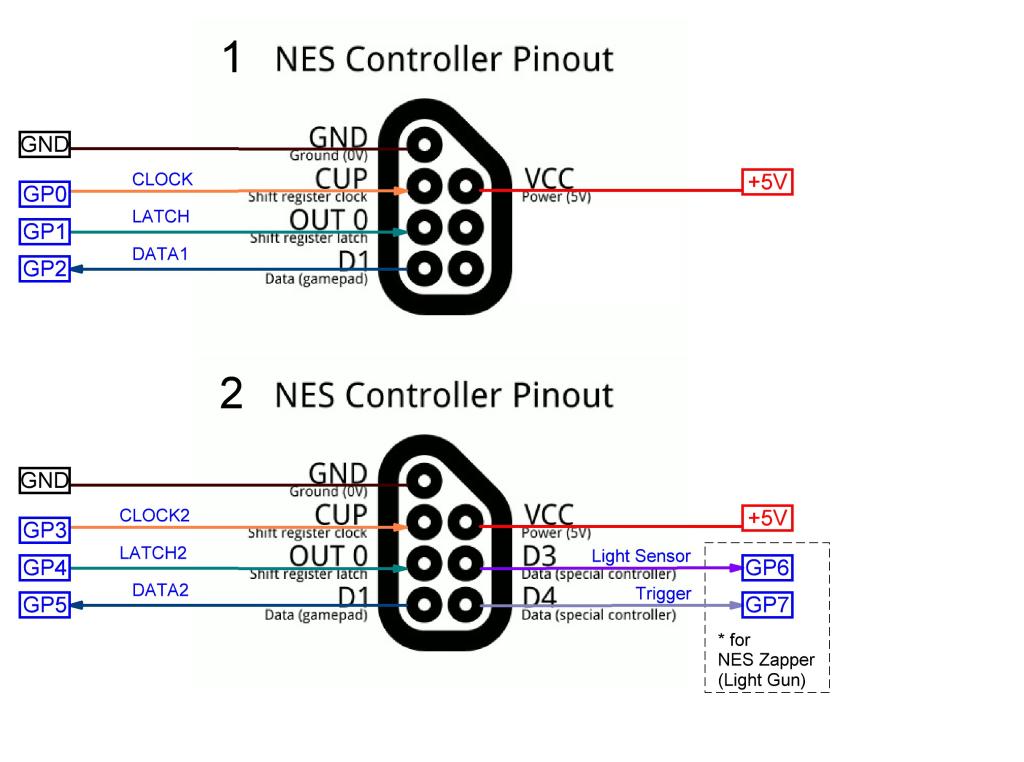
The question of how to connect two NES controllers to the ports of the Pico Computer 3 remains open. Currently, the configuration uses the first 8 ports (GP0–GP7) to accommodate two separate NES controllers (see the diagram above or the one in the author’s GitHub repository). However, alternative connection schemes could be adopted, provided there are proposals or designs for adapters that allow NES or SNES controllers to be connected to the Pico Computer 3’s GPIO ports.
Mixtel90 Guru Joined: 05/10/2019 Location: United KingdomPosts: 9328
Posted: 09:24pm 08 Nov 2026
Copy link to clipboard
Print this post
It would be far better if the pins could be specified in a config file in the same directory that the game is started from. Specifying specific pins for any hardware can be very risky. Anything can happen in future. Even now, there is no standard pin for PSRAM select. GP0 is one of those that can be used. GP0/GP1 are also the Raspberry Pi standard pins for the first UART, even if MMBasic uses GP8/GP9. MMBasic sometimes assumes that GP6/GP7 will be available for audio too. It all depends on the build, and the PC3 is only one way to connect a group of "modules" - any other way is just as valid and will still work, they just can't be configured as easily (usually!).
There isn't really an answer. On the Pico and CMM2 you have a choice of USB or WII controllers, with the Pico also supporting Bluetooth controllers. There has never been a standard for other types.Mick
javavi Guru Joined: 01/10/2023 Location: UkrainePosts: 636
Posted: 11:34pm 09 Nov 2026
Copy link to clipboard
Print this post
Many thanks to Peter. Now I, too, have an original Pico Computer 3 unit to play around with! ))
Mixtel90 Guru Joined: 05/10/2019 Location: United KingdomPosts: 9328
Posted: 08:12am 10 Nov 2026
Copy link to clipboard
Print this post
Excellent! If anyone deserves one it's you. :) I have controllers just like that. :)
I mads an attempt some time ago to standardise on a custom made I2C controller for MMBasic. The sound of apathy was deafening. :) I understand why, getting a decent enclosure and buttons isn't cheap - more than the cost of something like the USB NES controllers ready built. In return, though, you have a controller that you have full control over. You can interface it in any way you want and have it in any design.

 Notice. New forum software under development. It's going to miss a few functions and look a bit ugly for a while, but I'm working on it full time now as the old forum was too unstable. Couple days, all good. If you notice any issues, please contact me.


 Print this post