Notice. New forum software under development. It's going to miss a few functions and look a bit ugly for a while, but I'm working on it full time now as the old forum was too unstable. Couple days, all good. If you notice any issues, please contact me.
ville56 Guru Joined: 08/06/2022 Location: AustriaPosts: 642
Posted: 03:24pm 07 Sep 2026
Copy link to clipboard
Print this post
Jim,
may I ask you for another small improvement to MMCC. I'm woking on a notebook with limited display space and thus I have to relatively often change from/to setup -> show full menues as the bottom lines are below the screen area with full menues. If that would be put into a clickable button in both display modes (e.g. to toggle between modes) it would be much easier to change between modes.
Gerald 73 de OE1HGA, Gerald
TassyJim Guru Joined: 07/08/2011 Location: AustraliaPosts: 6626
Posted: 08:44pm 07 Sep 2026
Copy link to clipboard
Print this post
Remember that you can turn off individual rows of buttons. That might help a bit. I think the any more buttons will make things worse when in full menus. I will think about it.
ville56 Guru Joined: 08/06/2022 Location: AustriaPosts: 642
Posted: 06:48pm 24 Sep 2026
Copy link to clipboard
Print this post
Jim,
just playing around with VT100 escape sequences. MMCC does interprete the attributes for underline on, blink on, inverse on properly but does not do the "off" counterpart commands for these whereas e.g. putty does ...
example: print chr$(27)+"[4m" turns underline on but print chr$(27)+"[24m" does not turn it off again.
Gerald 73 de OE1HGA, Gerald
TassyJim Guru Joined: 07/08/2011 Location: AustraliaPosts: 6626
Posted: 09:09pm 24 Sep 2026
Copy link to clipboard
Print this post
You are right, the only way to reset underline is print chr$(27)+"[0m" which resets all attributes
The only attributes MMCC handles are Normal, Bold, Underline, Reverse and Invisible. MMCC only allows one attribute for a character at a time.
I think I can reset individual attributes without upsetting anything. I will do some testing.
ville56 Guru Joined: 08/06/2022 Location: AustriaPosts: 642
Posted: 06:09am 25 Sep 2026
Copy link to clipboard
Print this post
Sorry Jim to bother you,
just saw that plain VT100 per se only accepts "esc [0m" to reset atttributes. First I relied on AI answer but then I found the good ole VT100 programming reference card. For me AI more and more means "All Incorrect".
It is a long time ago I programmed a VT100 and memory slowly fades ... maybe 1990 when I wrote an IBM 3270 emulator for a PDP11 (in assembler) ...
Gerald 73 de OE1HGA, Gerald
TassyJim Guru Joined: 07/08/2011 Location: AustraliaPosts: 6626
Posted: 08:27am 25 Sep 2026
Copy link to clipboard
Print this post
MMBasic tends to use a few other VT commands and is not strict VT100 MMCC uses a sub-set of various standards as I se fit and is easy to do.
I can add the codes to reset the individual attributes. What I can't do is allow bold + underline at the same time. That's a restriction of my compiler. I would have to do the underline the hard way. Bold or underline and reverse will OK
ville56 Guru Joined: 08/06/2022 Location: AustriaPosts: 642
Posted: 10:33am 25 Sep 2026
Copy link to clipboard
Print this post
Jim,
for me it's ok if you leave it as it is. Reset all attributes works and I can easily live with that. My problem was that I just hadn't figured out to use "reset all attributes" as I always used the individal form (many years ago).
But I found another minor issue. It seems that in MMCC if a program is large or takes longer to download the run command after download is not issued anymore. Maybe there is a timeout one can adapt in the config file ...
Example that works:
Clock> Z:\Kits\PicoMite\BAS\!Lib\Indirect-Command\ICP-V1.5.bas Uploading using: 'target port\COM18:115200 s\picomite Upload started NEW > AUTOSAVE N Progress: 550/565 Enter ctrl-Z, F1, or F2 to exit
Time taken: 3370mS Saved 27202 bytes > > RUN MCR> MCR> MCR>
Example that fails:
MCR> Z:\Kits\PicoMite\BAS\Nixie-Uhr\Clock-V1.2.1.bas Uploading using: 'target port\COM18:115200 s\picomite Upload started NEW > AUTOSAVE N Progress: 2400/2424 Enter ctrl-Z, F1, or F2 to exit
Time taken: 9344mS Saved 118633 bytes > >
issuing RUN starts the program without any error ....
Gerald 73 de OE1HGA, Gerald
TassyJim Guru Joined: 07/08/2011 Location: AustraliaPosts: 6626
Posted: 11:16am 25 Sep 2026
Copy link to clipboard
Print this post
In MMCC.inf about line 110 there is an option Autosave end delay try increasing the value. Add another 500 or 1000
ville56 Guru Joined: 08/06/2022 Location: AustriaPosts: 642
Posted: 11:30am 25 Sep 2026
Copy link to clipboard
Print this post
Perfect, thanks for the info, setting it to 2500 did the job.
Gerald 73 de OE1HGA, Gerald
Volhout Guru Joined: 05/03/2018 Location: NetherlandsPosts: 6187
Posted: 11:32am 25 Sep 2026
Copy link to clipboard
Print this post
At Jim,
Changing Autosave delay and File list delay to 3000 helps a lot in my application (PicoMiteVGA and Game*Mite). I had occasional timeouts in file list in filemanager, and not executed RUN after uploading to pico. These are gone now. But every setup is different. YMMV.
Nice that you provided the option to change it. Thanks !
PeteCotton Guru Joined: 13/08/2020 Location: CanadaPosts: 667
Posted: 04:27pm 27 Sep 2026
Copy link to clipboard
Print this post
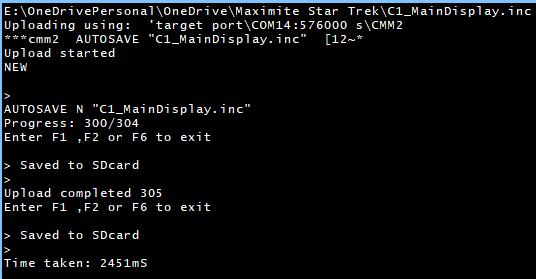
After upgrading to the latest MMEdit as part of the virus check I've got to say Wow! Thanks again Jim. We don't say it enough.
I'm not sure how old my previous version of MMedit was, but this new version appears to turn off the echo to screen when downloading files to my CMM2, and it's a game changer.
Less than 2 and half seconds to download a file. Brilliant!
Once again, thank you!
Edited 2026-09-28 02:27 by PeteCotton
TassyJim Guru Joined: 07/08/2011 Location: AustraliaPosts: 6626
Posted: 08:22pm 27 Sep 2026
Copy link to clipboard
Print this post
Don't thank me, it is Peter and Gerry who made the changes to MMBasic - adding the 'N' option to AUTOSAVE.
PeteCotton Guru Joined: 13/08/2020 Location: CanadaPosts: 667
Posted: 11:20pm 27 Sep 2026
Copy link to clipboard
Print this post
Who ever is responsible, it makes a huge difference, especially with large programs.
disco4now Guru Joined: 18/12/2014 Location: AustraliaPosts: 1158
Posted: 04:31am 21 Oct 2026
Copy link to clipboard
Print this post
Hi Jim, I think MMCC might not like filenames with 'error' in them when loading to the CMM2.
If the file name contains 'error' e.g. "tst_error_handling.bas" is seems like it fails to accept AUTOSAVE N "tst_error_handling.bas" as a valid command and falls back to AUTOSAVE "tst_error_handling.bas" , which is then loaded into the program as the first line.
Changing the filename so it doesn't have 'error' in it make everything good and AUTOSAVE N is used.
I have changed the filename to "tst_err_handling.bas" so not an issue that needs attention for now.
TassyJim Guru Joined: 07/08/2011 Location: AustraliaPosts: 6626
Posted: 08:53am 21 Oct 2026
Copy link to clipboard
Print this post
Thanks Gerry, I was being lasy. I will fix it.VK7JH MMedit
terekgabor Senior Member Joined: 02/01/2026 Location: HungaryPosts: 154
Posted: 10:40am 21 Oct 2026
Copy link to clipboard
Print this post
Hello,
can I somehow put new instructions for example to Webmite syntax? I delevop new instructions for myself in Webmite version.
Thanks!
G@bor
TassyJim Guru Joined: 07/08/2011 Location: AustraliaPosts: 6626
Posted: 07:48pm 21 Oct 2026
Copy link to clipboard
Print this post
In the data folder there is a file kw_list.txt The data folder can be found from Help/About
Then there are the *.tkn files. These are used to highlight words. You can add whatever you like to these. You can also create your own extra version. Any new *.tkn files are found when MMEdit starts. With keywords such as "continue do" that contain a space, the space is replaced with ~ in the tkn files - "continue~do" The files will be overwritten with a program update so keep copies of your modified files.

 Notice. New forum software under development. It's going to miss a few functions and look a bit ugly for a while, but I'm working on it full time now as the old forum was too unstable. Couple days, all good. If you notice any issues, please contact me.


 Print this post