Notice. New forum software under development. It's going to miss a few functions and look a bit ugly for a while, but I'm working on it full time now as the old forum was too unstable. Couple days, all good. If you notice any issues, please contact me.
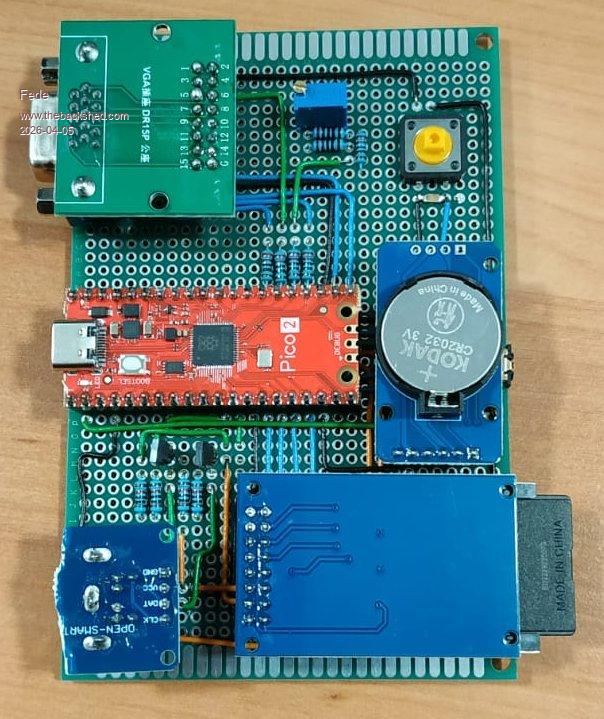
I program in the VGAPicoMite that I built myself and then check if it works in PicoCalc.
I find it more convenient that way.
And while we're at it, here are a few photos.
The bad thing is that my short vacation is about to end.
Peter63 Senior Member Joined: 28/07/2017 Location: SwedenPosts: 206
Posted: 06:22am 05 Apr 2026
Copy link to clipboard
Print this post
Ok, I also usually do something similar when I test things.
Have you tried so you get longer lines?
/Peter63
phil99 Guru Joined: 11/02/2018 Location: AustraliaPosts: 3381
Posted: 06:41am 05 Apr 2026
Copy link to clipboard
Print this post
Despite limited screen width lines can be 255 characters.
One method is to press <enter> just before the edge of the screen and continue on the next line. When the line is complete go back and delete the unwanted CR. You won't be able to see the rest of the line but it is still there. If you need to edit that line break it with <enter> near the RHS and the next portion appears.
I haven't been able to get font 7 to work in the editor.
Oh well, it's not too bad.
Thanks to everyone for the advice.
toml_12953 Guru Joined: 13/02/2015 Location: United StatesPosts: 723
Posted: 08:26pm 05 Apr 2026
Copy link to clipboard
Print this post
What version has OPTION EDIT in it? I can't find it in the 6.00.01 manual and it doesn't seem to work in 6.00.02b0, at least on a PicoCalc. Is it for VGA/HDMI only? Where can I find a manual that includes it?
matherp Guru Joined: 11/12/2012 Location: United KingdomPosts: 11882
Posted: 08:48pm 05 Apr 2026
Copy link to clipboard
Print this post
Never did - it is a CMM2 command You don't say what version so diffiecult to give the answer. On RP2350 VGA or HDMI then OPTION DEFAULT MODE 3 OPTION LCDPANEL CONSOLE 7

 Notice. New forum software under development. It's going to miss a few functions and look a bit ugly for a while, but I'm working on it full time now as the old forum was too unstable. Couple days, all good. If you notice any issues, please contact me.

 Print this post




.jpeg)
.jpeg)

