Home
JAQForum Ver 24.01
Log In or Join  
Active Topics
Local Time 08:15 22 Apr 2026 Privacy Policy
Jump to

Notice. New forum software under development. It's going to miss a few functions and look a bit ugly for a while, but I'm working on it full time now as the old forum was too unstable. Couple days, all good. If you notice any issues, please contact me.

Forum Index : Microcontroller and PC projects : PicoMite User Manual Errata

Author Message
toml_12953
Guru

Joined: 13/02/2015
Location: United States
Posts: 602
Posted: 04:32am 05 Mar 2026
Copy link to clipboard 
Print this post

On page 89 of the PicoMite User Manual, for the description of

OPTION CONSOLE output


it says, "... temporary option that is reset when a program exists."

Should that be "exits" rather than "exists"?

I don't see a description of

MM.INFO(BATTERY)


Does this command only exist on PicoCalc?
Edited 2026-03-05 14:35 by toml_12953
 
ville56
Guru

Joined: 08/06/2022
Location: Austria
Posts: 450
Posted: 05:51am 05 Mar 2026
Copy link to clipboard 
Print this post

Could we leave this thread permanently to feedback manual errors. There are certainly more and also suggestions for improvements.
                                                                 
73 de OE1HGA, Gerald
 
Geoffg

Guru

Joined: 06/06/2011
Location: Australia
Posts: 3356
Posted: 08:22am 05 Mar 2026
Copy link to clipboard 
Print this post

At this moment Peter has the manual (adding some new stuff for the RC).  When I get it back I will go through this thread for any additional changes.

So, please keep adding to this thread.  

Thanks,
Geoff
Geoff Graham - http://geoffg.net
 
Peter63
Senior Member

Joined: 28/07/2017
Location: Sweden
Posts: 153
Posted: 06:52am 07 Mar 2026
Copy link to clipboard 
Print this post

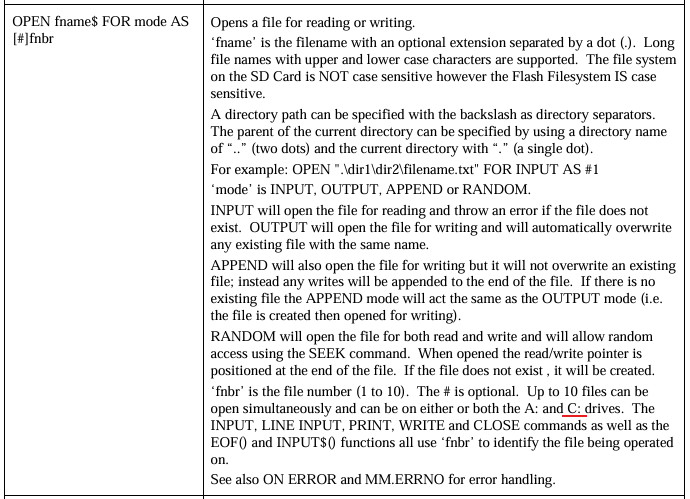
Notes on MMBasic BASIC Interpreter Ver 6.02.00 - manual


maybe change to  B:  

/Peter63
 
phil99

Guru

Joined: 11/02/2018
Location: Australia
Posts: 3156
Posted: 07:24am 07 Mar 2026
Copy link to clipboard 
Print this post

Presumably the last sentence of the first paragraph will also be updated, as A: is no longer case sensitive.
 
lizby
Guru

Joined: 17/05/2016
Location: United States
Posts: 3742
Posted: 09:30pm 08 Mar 2026
Copy link to clipboard 
Print this post

Regarding SPRITE SET TRANSPARENT n, the manual says "Sets the colour code (0-15) which will be used as transparent when sprites are displayed over a background (defaults to 0)."

I had difficulty finding out what the colour codes 0-15 stood for, other than 0 for black. A search of the forum found a Peter Mather post which gave some numbers and a clue to what they derived from: RGB121 values. It appears to distill down to this, and some indication in the manual might help:

' =============================================================
' RGB121 (4bpp) HARDWARE SPRITE PALETTE
' Bit Layout: [Red] [Green_Hi] [Green_Lo] [Blue]
' =============================================================
Const HW_BLACK    = 0  ' (0000) MMBasic 0
Const HW_BLUE     = 1  ' (0001) MMBasic 1

Const HW_MYRTLE   = 2  ' (0010) MMBasic 8  (Low Green)
Const HW_COBALT   = 3  ' (0011) MMBasic 9  
Const HW_MIDGREEN = 4  ' (0100) MMBasic 10 (High Green)
Const HW_CERULEAN = 5  ' (0101) MMBasic 11

Const HW_GREEN    = 6  ' (0110) MMBasic 2  (Full Green)
Const HW_CYAN     = 7  ' (0111) MMBasic 3  

Const HW_RED      = 8  ' (1000) MMBasic 4
Const HW_MAGENTA  = 9  ' (1001) MMBasic 5

Const HW_BROWN    = 10 ' (1010) MMBasic 14 (Red + Low Green)
Const HW_LILAC    = 11 ' (1011) MMBasic 15
Const HW_RUST     = 12 ' (1100) MMBasic 12 (Red + High Green)
Const HW_FUCHSIA  = 13 ' (1101) MMBasic 13

Const HW_YELLOW   = 14 ' (1110) MMBasic 6  (Red + Full Green)
Const HW_WHITE    = 15 ' (1111) MMBasic 7


Having this information also in the sprite manual would help.
PicoMite, Armmite F4, SensorKits, MMBasic Hardware, Games, etc. on FOTS
 
toml_12953
Guru

Joined: 13/02/2015
Location: United States
Posts: 602
Posted: 09:43pm 08 Mar 2026
Copy link to clipboard 
Print this post

  lizby said  Regarding SPRITE SET TRANSPARENT n, the manual says "Sets the colour code (0-15) which will be used as transparent when sprites are displayed over a background (defaults to 0)."

I had difficulty finding out what the colour codes 0-15 stood for, other than 0 for black. A search of the forum found a Peter Mather post which gave some numbers and a clue to what they derived from: RGB121 values. It appears to distill down to this, and some indication in the manual might help:

Having this information also in the sprite manual would help.


Page 123 of the main manual (MAP RESET command) has the list although it would be nice to have it in any manual that references it.
 
lizby
Guru

Joined: 17/05/2016
Location: United States
Posts: 3742
Posted: 12:58am 09 Mar 2026
Copy link to clipboard 
Print this post

  toml_12953 said  Page 123 of the main manual (MAP RESET command) has the list although it would be nice to have it in any manual that references it.


Thanks. I would never have known to look there.
PicoMite, Armmite F4, SensorKits, MMBasic Hardware, Games, etc. on FOTS
 
Print this page


To reply to this topic, you need to log in.

The Back Shed's forum code is written, and hosted, in Australia.
© JAQ Software 2026